
Affiliate Disclaimer: This post may contain affiliate links. As an affiliate, I may earn a commission if you purchase through my links, at no extra cost to you. Please read our full disclosure for more info.
You’ve successfully set up your Pinterest Business account. The profile looks professional, your domain is claimed, and you’re ready to start saving pins.
But when you log in and follow the official Pinterest setup—their current platform documentation specifically instructs users to “Click the plus icon at the bottom of your screen, then click Board”—you suddenly freeze.
What should I name them? How many do I actually need? What if my niche is too specific?
It is incredibly easy to overcomplicate this step. Many beginners make the mistake of creating 50 different boards right away, giving them clever, vague names like “Yummy in my Tummy” or “Wanderlust Vibes.”
When Rina and I started our YouTube cooking project in 2019, we made a massive miscalculation. We ended up spending more than $50,000 on cameras, lighting, audio gear, kitchen upgrades, and all the little production tools we thought would “guarantee” success.
We learned the hard way that no amount of expensive equipment can fix a weak strategy.
The exact same rule applies to Pinterest. Do not waste your limited budget right now on expensive, premium automated pinning software thinking it will speed up your success.
If your foundation—your boards—is confusing, your pins won’t get shown to the right people, no matter how much you spend on tools.
What You’ll Learn in This Guide
By the end of this post, you’ll know exactly how to set up the first boards on your Pinterest Business account — without overthinking, guessing, or creating dozens of vague categories that confuse the algorithm.
Here’s what you’ll learn:
- How many boards you actually need when starting from zero
- The simplest way to name your boards using clear, keyword‑rich phrases
- 25 beginner‑friendly board ideas across popular blogging niches
- The biggest naming mistakes that hurt your Pinterest SEO
- How to use free AI tools to generate custom board ideas for your niche
- What to do next once your foundational boards are created
This gives you a clean, search‑friendly structure so Pinterest knows exactly what your content is about — and so your future pins have a clear home from day one.
Why Your Pinterest Board Structure Matters
Pinterest is not a social media platform; it is a visual search engine.
According to the official Pinterest Business Help Center, the platform relies heavily on your board names and descriptions to categorize content. Their documentation explicitly states: “Boards give Pinterest context about your Pins. Make sure you’re saving Pins to relevant boards, and that your boards have descriptive, keyword-rich names.
If you write a blog post about “Budget Travel in Japan” and save it to a board named “Travel Goals,” Pinterest has to guess what the pin is about.
But if you save it to a board named “Japan Travel Tips” or “Budget Travel Destinations,” you instantly give the algorithm clear, highly relevant keywords based on those official guidelines.
Well-organized boards do two things:
- They help the algorithm categorize your content accurately so it appears in search results.
- They make it incredibly easy for a reader visiting your profile to find exactly what they are looking for.
How Many Boards Should You Start With?
You do not need 30 boards to launch your account. In fact, having dozens of empty boards with only one or two pins each looks unprofessional and actively confuses the algorithm.
Start with 5 to 10 highly relevant boards.
Think of these as the main categories of your blog. If you followed our guide on How to Choose a Profitable Blog Niche, your boards should naturally mirror the core topics you write about.
Start small. Fill these core boards consistently. You can always add more specific boards later as your blog grows and you create more varied content.
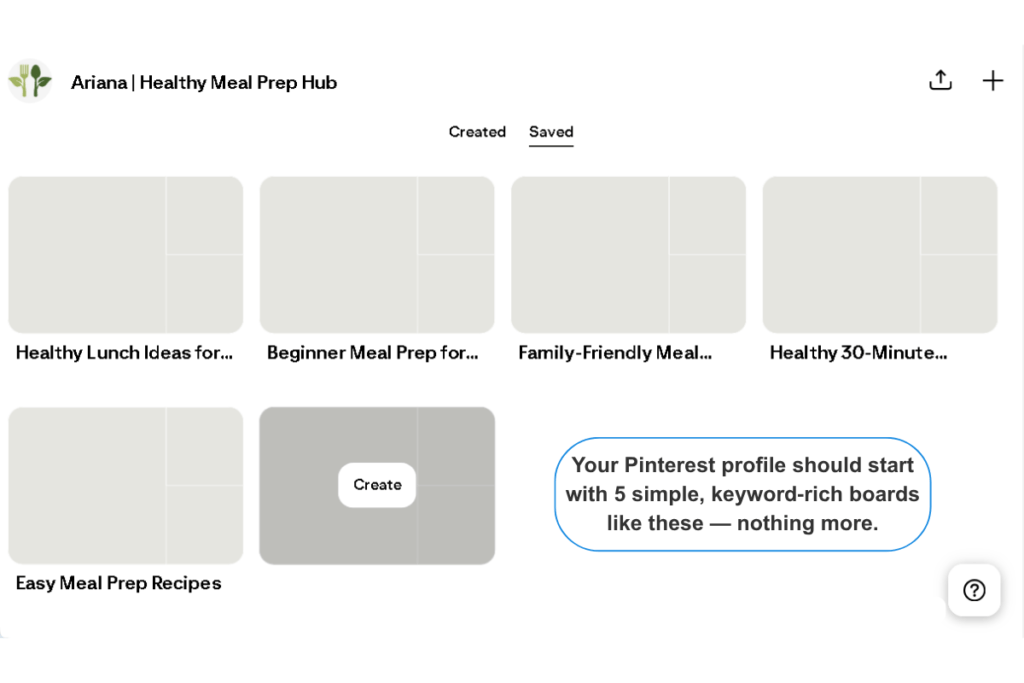
25 Simple Pinterest Board Ideas Across 5 Popular Niches
To give you a clear picture of what optimized, keyword-rich boards look like, here are 25 examples broken down by popular blogging niches. Notice how literal and search-friendly these names are.
Food & Recipe Blogs
Avoid names like “Dinner Ideas” or “Sweet Tooth.” Get specific.
- Quick Weeknight Dinners
- Healthy Vegan Desserts
- Easy Breakfast Ideas for Kids
- Meal Prep Recipes for Beginners
- Gluten-Free Baking
Personal Finance Blogs
Avoid names like “Money Moves.” Tell them exactly what they will learn.
- Frugal Living Tips
- Budgeting for Beginners
- Side Hustle Ideas to Make Money
- How to Save Money Fast
- Debt Payoff Motivation
Travel Blogs
Avoid names like “Wanderlust.” Focus on destinations and travel styles.
- Budget Travel Hacks
- Solo Female Travel Tips
- Europe Travel Itineraries
- Packing Lists for Vacations
- Family Road Trip Ideas
Lifestyle & Mom Blogs
Avoid names like “Mom Life.” Target the specific problems you solve.
- Home Organization Hacks
- Toddler Activities at Home
- Self-Care Routine for Moms
- Minimalist Cleaning Schedule
- Easy DIY Home Decor
Blogging & Business
Avoid names like “Boss Babe.” Use the exact terms people search for.
- How to Start a Blog
- Pinterest Marketing Tips
- Make Money Online for Beginners
- Social Media Strategy for Beginners
- Email Marketing Tips
The Golden Rule for Naming Your Pinterest Boards
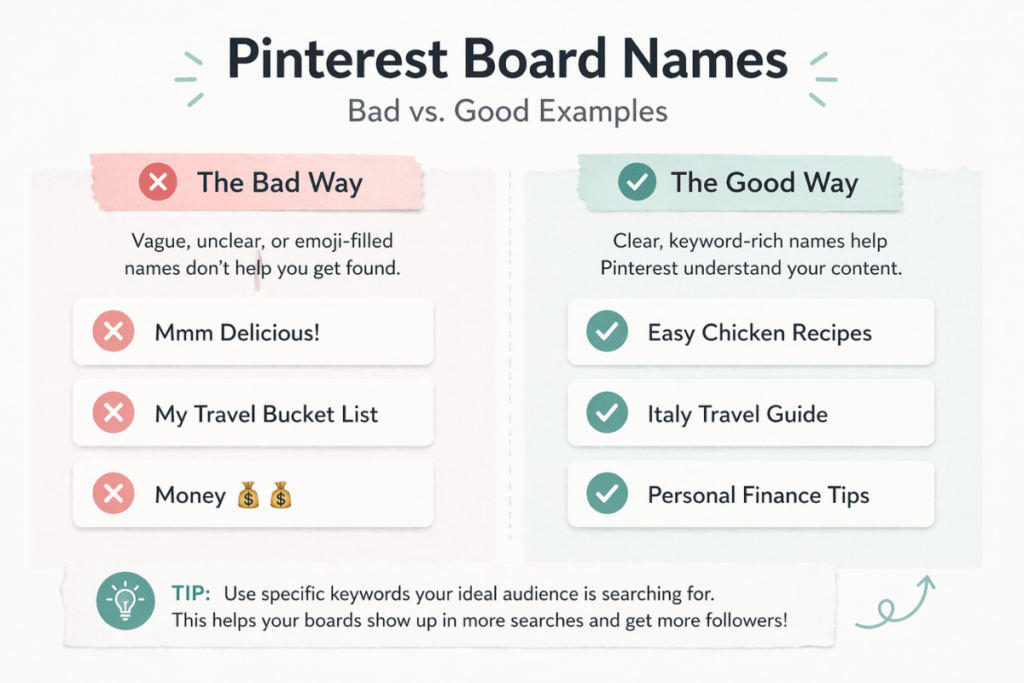
If you take nothing else from this post, remember this: Clarity beats cleverness every single time. Pinterest doesn’t reward creativity in board names — it rewards clarity and relevance.
Never name a board something cute, abstract, or filled with emojis. Pinterest must be able to understand your board instantly, using the same words your audience types into the search bar.
The Bad Way (vague, unclear, no search intent):
- “Mmm Delicious!” — Pinterest can’t match this to any topic
- “My Travel Bucket List” — too broad; no destination or intent
- “Money 💰💰” — no keywords, no context, no category
The Good Way (literal, keyword‑rich, search‑friendly):
- “Easy Chicken Recipes”
- “Italy Travel Guide”
- “Personal Finance Tips”
Treat your board names exactly like you treat the categories on your blog — simple, descriptive, and built for search.
🤖 AI Assistance: Generate Custom Board Ideas in Seconds
If your specific niche isn’t listed above, you don’t have to brainstorm alone. You can use a free AI tool to map out your initial board structure in seconds.
We recommend using Google Gemini for this because it’s completely free, incredibly fast, and excellent at structuring simple lists without pushing you toward expensive upgrades.
Here is the exact prompt you can copy and paste into Gemini:
“I am starting a new Pinterest Business account for my blog. My blog niche is [Insert Your Niche, e.g., Indoor Plant Care]. I want to create 8 foundational Pinterest boards. Please generate a list of 8 simple, highly searchable, keyword-rich Pinterest board names. Do not use clever or vague names. Use the exact phrases a beginner would type into the Pinterest search bar.”
Gemini will instantly provide you with a clean, structured list of optimized board names to build your profile around.

What to Do Next
Now that your 5 to 10 foundational boards are created and properly named, you’ve built the perfect container for your future content.
Most beginners never get this far — but this structure is what tells Pinterest exactly what your account is about.
If you’re serious about mastering Pinterest and want a complete, step‑by‑step roadmap that goes far deeper than board setup, we highly recommend checking out Anastasia Blogger’s Pinterest courses. Her strategies are data‑driven, algorithm‑aligned, and refreshingly free from the usual guru hype.
Next up, you’re going to start designing your actual Pinterest pins — but before you jump into Canva, make sure you’ve already done your Pinterest keyword research.
If you haven’t completed that step yet, pause here and read this first: How to Find Pinterest Keywords (The Easiest Method for Beginners).
This is where you’ll learn how to uncover the exact search terms Pinterest users are typing in — the same keywords you’ll need to place on your graphics, titles, and descriptions.
Once you’ve done your keyword research, you’re ready for the next guide: Pinterest Pin Design Guide.
This is where you’ll learn how to turn those keywords into clean, scroll‑stopping pin designs that actually get clicks and saves.