

Affiliate Disclaimer: This post may contain affiliate links. As an affiliate, I may earn a commission if you purchase through my links, at no extra cost to you. Please read our full disclosure for more info.
Now that you’ve learned how to craft titles and descriptions that get your pins noticed in our guide on Pinterest SEO Secrets: Writing Titles and Descriptions That Get Saves, you have a solid foundation for getting your content distributed.
But there is a silent trap many beginners fall into: spending hours writing a beautiful, perfectly optimized blog post that absolutely no one on Pinterest is looking for.
When you are protecting your budget and your limited time, guessing what your audience wants is a luxury you cannot afford. You need fast, visible results, and that means prioritizing topics with proven, existing demand.
That is where Pinterest Trends comes in. It is a native tool that eliminates the guesswork by showing you exactly what users are actively planning and searching for.
In 2026 and beyond, mastering this tool is your quickest path to consistent pin reach and high Save rates without spending a dime on premium research software.
What you will learn
By the end of this guide, you’ll know how to:
- Use Pinterest Trends to validate your blog ideas
Check real search demand before writing so you never waste time on topics no one is looking for. - Read the Trends graph like a pro
Understand the 0–100 scale, spot rising interest, and identify when a topic is gaining or losing momentum. - Tell the difference between seasonal and evergreen topics
Recognize which ideas bring steady year‑round traffic and which ones explode during specific months. - Time your content for maximum reach
Apply the 45–60 day publishing rule so your posts hit Pinterest right before the surge of searchers arrives. - Find high‑performing long‑tail keywords
Use the Related Trends section to uncover niche‑specific topics your audience is already searching for. - Turn trend data into a beginner‑friendly content calendar
Plug your findings into Gemini to generate a simple, realistic 4‑week publishing plan.
Why Pinterest trends is your best free research tool
Unlike traditional search engines that people use to look up past facts or immediate fixes, Pinterest is a planning platform. People use it to design their future—from next week’s meal prep to next year’s financial budget.
Because of this “future-focused” Save psychology, Pinterest Trends operates like a crystal ball. It doesn’t just show you what was popular yesterday; it shows you the exact trajectory of a topic’s popularity.
For a beginner blogger operating with limited energy after a day job, this tool provides the ultimate financial and time safety. You never have to wonder if a topic is worth your two hours of writing time. The data tells you.
How to access and read the Pinterest trends dashboard
To use the tool, you need a free Pinterest Business account. If you haven’t set yours up yet, it takes less than two minutes and costs nothing.
Before you can analyze trends or compare keywords, you need to know where the tool lives inside your Pinterest dashboard.
How to access and read the Pinterest Trends dashboard
To use Pinterest Trends, you need a free Pinterest Business account. If you haven’t created one yet, it takes less than two minutes and costs nothing.
Before you can analyze trending topics, you need to know where the tool actually lives inside Pinterest’s updated 2026 dashboard.
Finding the Trends tool
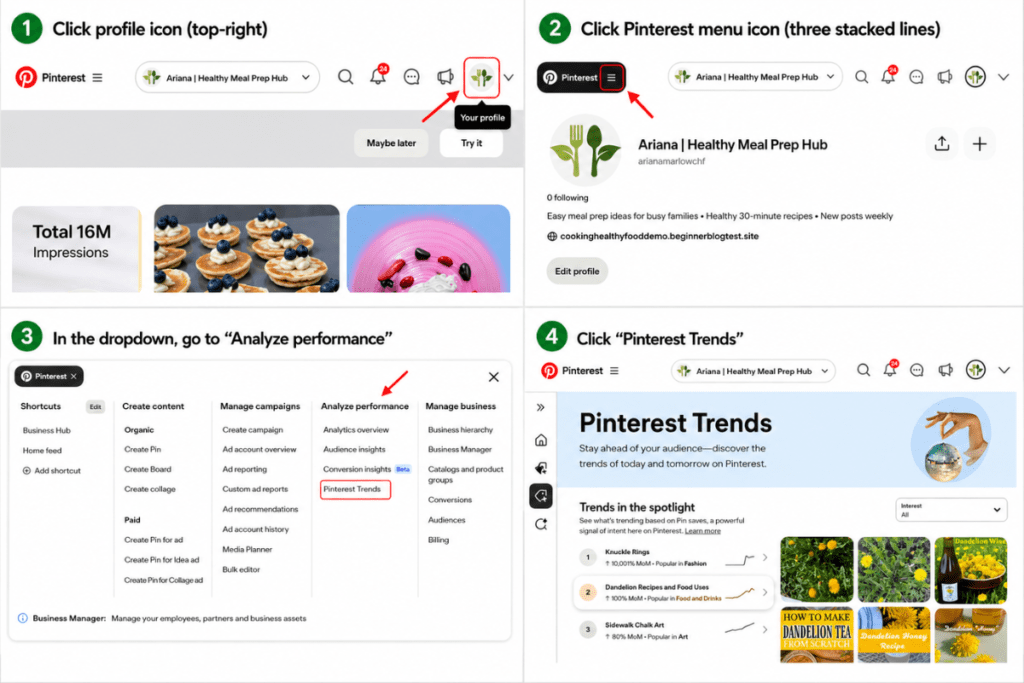
Pinterest has redesigned its Business Hub, and the Trends tool has moved. Here is the exact, current click‑path:
- Click your profile icon in the top‑right corner
- Click the Pinterest menu icon (the three stacked lines)
- In the dropdown panel, scroll to the Analyze performance column
- Click Pinterest Trends
This opens the full Trends dashboard where you can start researching topics, comparing keywords, and spotting seasonal spikes.
How to enter a keyword in Pinterest Trends
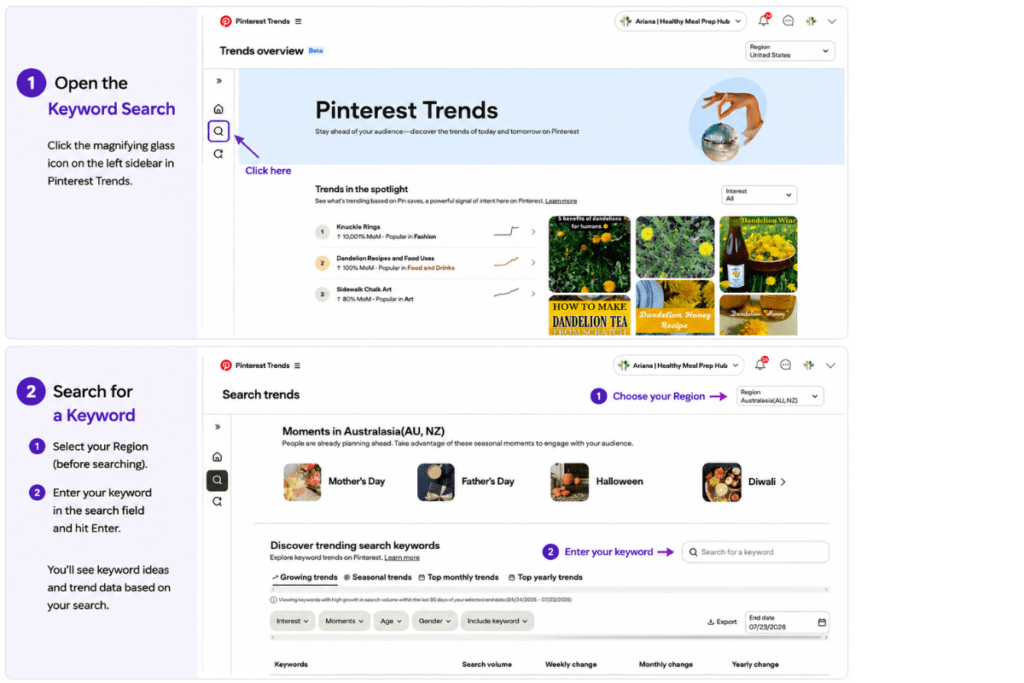
Before you can see any graphs, you need to open the search field. Pinterest’s current layout hides the search bar by default, so you must manually activate it.
To enter a keyword:
- Click the magnifying glass icon on the left sidebar
- The search field will appear at the top of the page
- Type your topic into the search bar and press Enter
Once you do this, Pinterest will generate a line graph showing how interest in your topic rises and falls over time.
Reading the graphs and what the numbers actually mean
After opening Pinterest Trends, click the magnifying glass icon on the left sidebar to reveal the search field. Type your keyword (for example: “easy dinner recipes”) and press Enter.
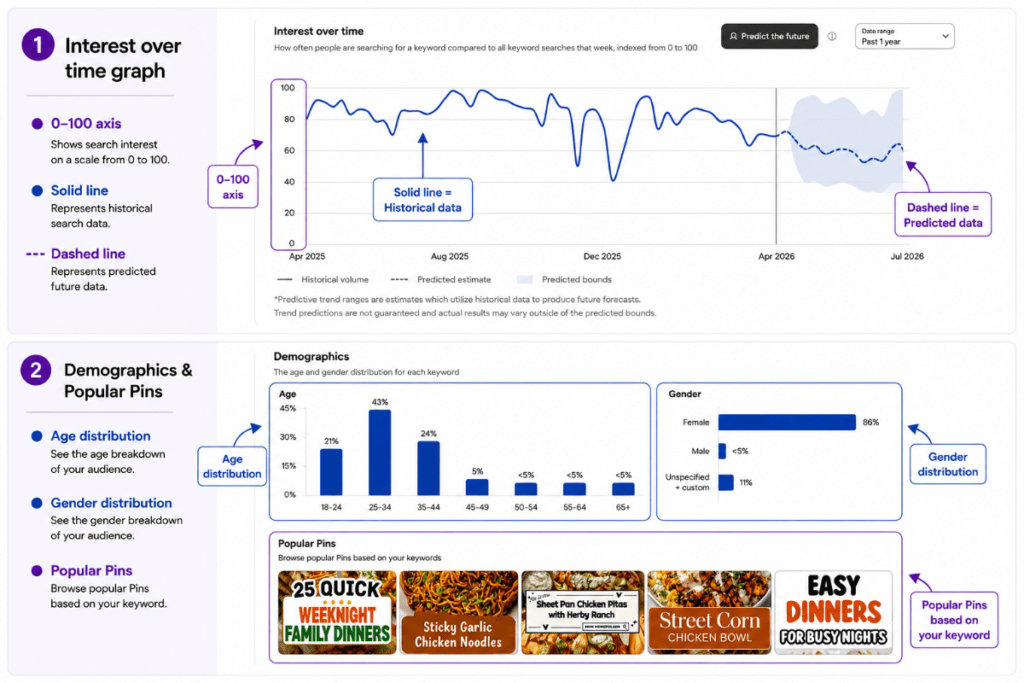
Pinterest will then load a line graph that looks a bit like a stock‑market chart, showing how interest in your topic rises and falls over time.
The most important part of this graph is the vertical axis (the numbers on the left). Pinterest Trends uses a normalized scale from 0 to 100, not actual search volume.
- 100 = the topic’s highest point of popularity within the selected timeframe
- 50 = half as popular as its peak
- 0 = minimal or no measurable interest
This relative scale makes it easy to see whether a topic is gaining momentum, declining, or holding steady—so you can decide whether it’s worth creating content for.
Seasonal spikes vs. evergreen growth
As you explore different keywords, you’ll notice two types of graphs. Understanding the difference helps you plan a content strategy that brings both steady traffic and big bursts of growth.
Seasonal spikes look like flat lines that suddenly shoot up into a sharp peak once a year.
Food example: “Thanksgiving meal prep” stays near zero most of the year and surges in November.
Finance example: “New year budgeting templates” jumps sharply in late December and January.
Evergreen growth looks like a smooth, rolling wave that never drops to zero.
Food example: “Quick weeknight dinners” maintains steady interest all year.
Wellness example: “Stress relief habits” stays consistently relevant.
A strong Pinterest strategy uses both: evergreen topics for reliable daily traffic, and seasonal topics for powerful traffic spikes when the timing is right.
The timing rule: when to publish trending content
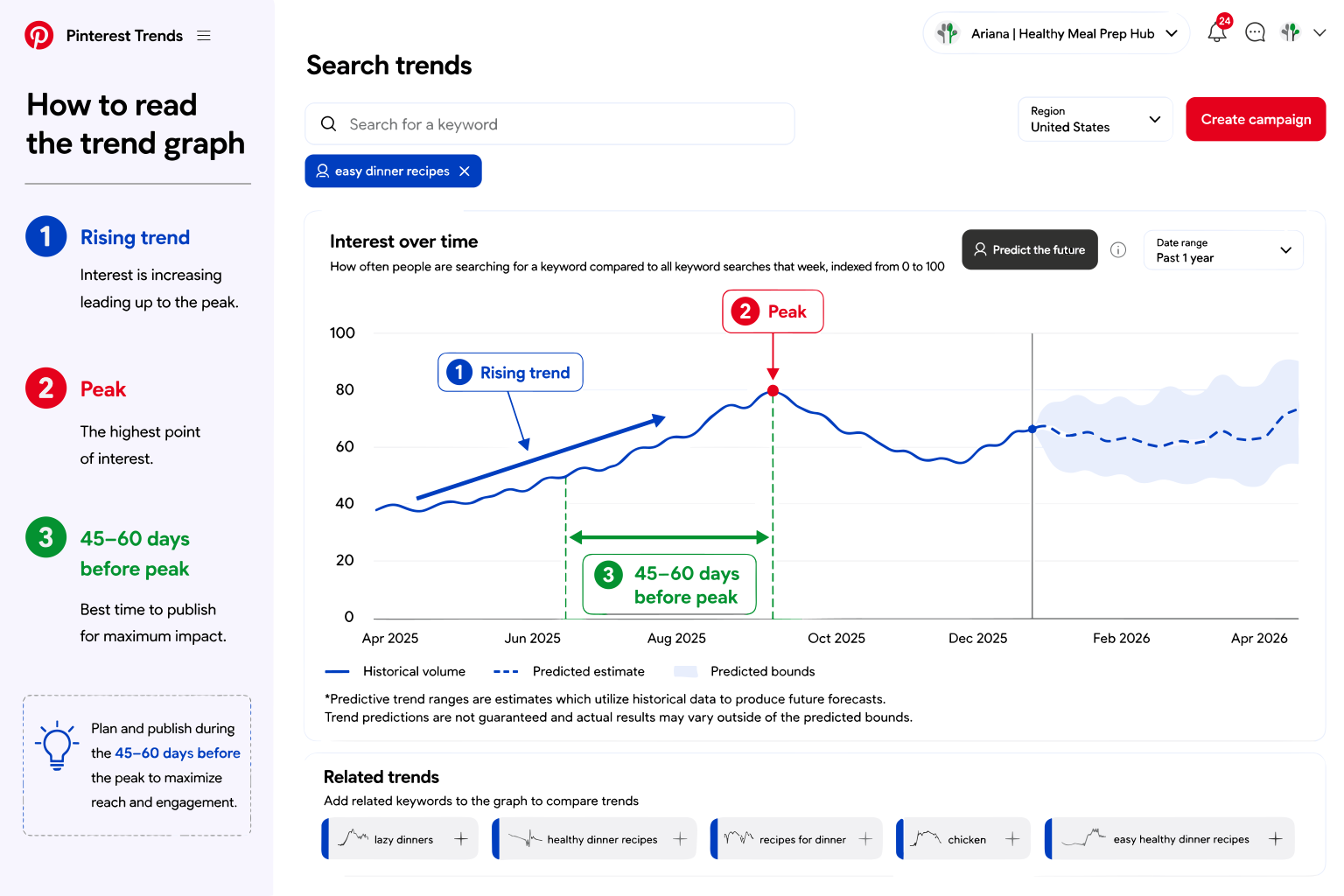
A common beginner mistake is publishing seasonal content at the exact moment the trend peaks. If a topic is exploding in December and you publish in December, you’re already too late.
Pinterest needs time to index your pins, test them with small audiences, and slowly expand distribution. By the time your pin is ready to be pushed out, the trend has already passed.
The rule: Publish and pin your seasonal content 45 to 60 days before the peak.
If a finance trend peaks on January 1, you should be pinning that content in early November.
This gives Pinterest enough time to understand your pin, build engagement signals, and position it perfectly for the surge of searchers.
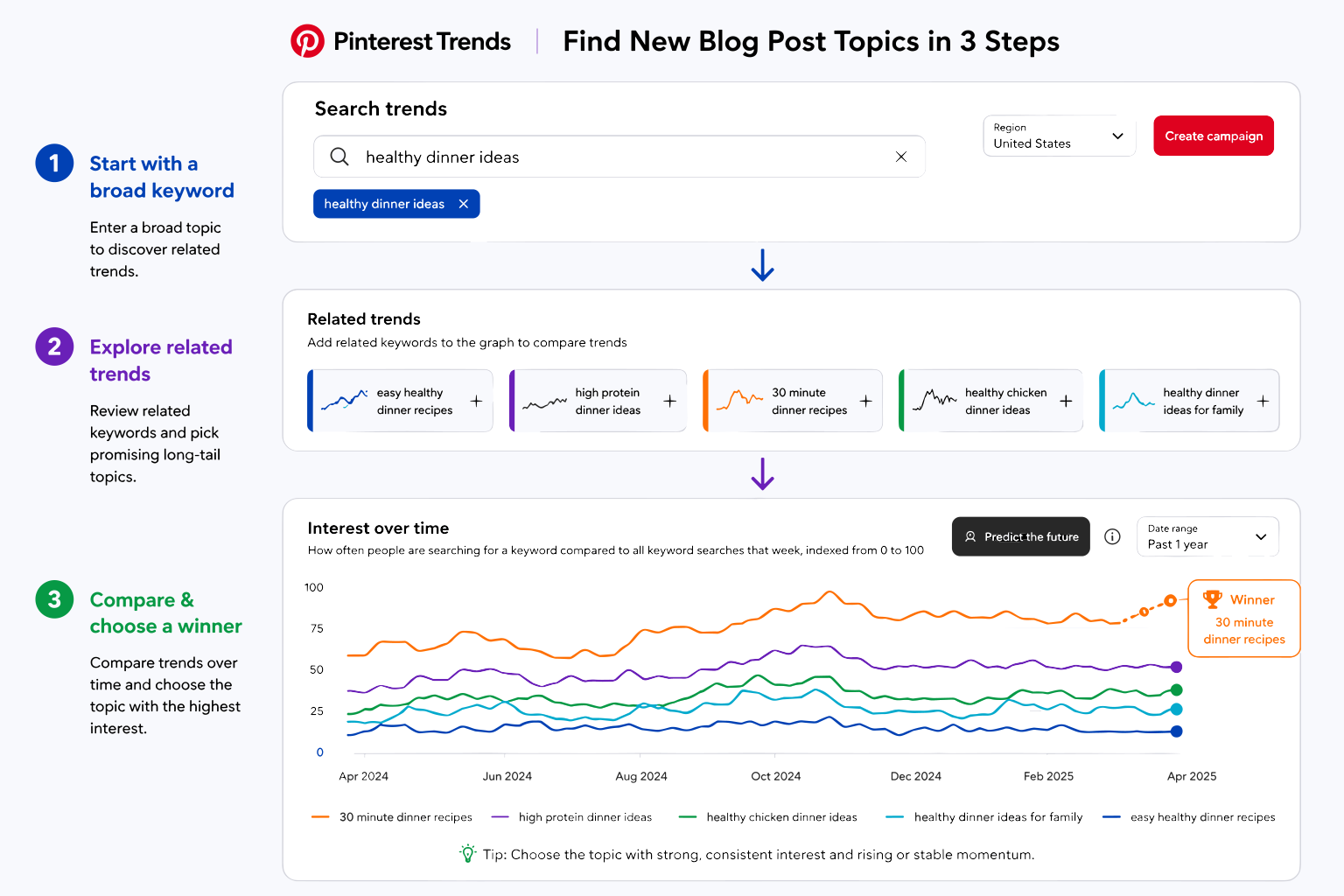
Step-by-step: how to find your next 5 blog post topics
Ready to fill your content calendar? Here’s a simple, zero‑cost workflow to uncover proven topics your audience is already searching for.
Step 1: Start with a broad seed keyword
Type a general category related to your niche into Pinterest Trends.
If you’re a parenting blogger, a seed keyword like “toddler activities” is perfect — broad enough to generate ideas, but specific enough to stay relevant.
Step 2: Look at related trends
Scroll down to the Related Trends section.
This is where Pinterest reveals the long‑tail keywords people search for alongside your main topic.
You might see ideas like:
- indoor toddler activities
- toddler sensory bins
- easy toddler crafts
These are real user search patterns — not guesses.
Step 3: Compare topic popularity
Click the plus icon next to each related trend to add it to your graph.
Compare them side by side:
- Keep the topics with the highest relative volume
- Discard the ones with weak or inconsistent interest
Your top performers become your next 5 blog posts.
You can also use these winning keywords to shape your site structure, similar to how we mapped categories in How to Choose Blog Categories That Work on Pinterest.
🤖 AI Assistance: turning trends into a content calendar
Once you’ve gathered 5 to 10 trending topics from Pinterest Trends, the next step is turning them into a simple, realistic publishing plan.
Instead of staring at a blank screen, let Google Gemini organize everything for you.
It’s completely free and works as a fast, beginner‑friendly brainstorming partner that transforms your research into a clear 4‑week schedule.
Copy and paste this prompt into Gemini:
I run a beginner-friendly [YOUR NICHE] blog. I used Pinterest Trends and found these popular topics that my audience is actively searching for:
[PASTE YOUR LIST OF TRENDING TOPICS]Please help me turn these topics into a realistic 4-week content calendar. I can publish one blog post per week.
For each week, provide:
- The specific topic from my list.
- A Pinterest-friendly blog post title that appeals to beginners.
- A brief 1-sentence outline of what the post should cover to solve the reader’s problem quickly.
Gemini will instantly convert your trend research into a structured plan so you can spend your energy writing — not organizing.
What’s next?
You now have the exact skills to find topics that guarantee your hard work gets seen.
Because this workflow uses free native tools and AI assistance, it costs you $0 to build a data-backed foundation for your blog.
With your content calendar filled with high-converting ideas, the next step is building a sustainable routine that keeps you consistent without burning out.
Up next, we’ll walk you through our proven, time-saving routine in The 1-Hour Nightly Pinterest Schedule for Busy Beginners.
Ready to get eyes on your new blog?
Anastasia Blogger’s Pinterest SEO Traffic Secrets shows you how to turn this setup into consistent, long-term traffic.