
This post contains affiliate links. As an affiliate, I may earn a commission if you purchase through my links, at no extra cost to you. I only recommend tools I personally use, have researched thoroughly, or that trusted blogging experts rely on every day.
Now that you’ve set up your blog categories and navigation menu from How to Create Blog Categories & Navigation Menu in WordPress (Step-by-Step), your site finally has structure. Visitors can find their way around. But there’s one page that does something no navigation menu can do on its own — it makes a stranger feel like they know you.
That page is your About page.
Most beginner bloggers either skip it, write a stiff bio in third person, or dump their entire life story. None of those approaches work. Your About page isn’t a résumé. It’s the place where a nervous first-time visitor — someone who just tapped through from a Pinterest pin — decides whether to trust you, Save your content, and come back.
In this guide, you’ll learn exactly how to write a blog about page that builds genuine connection with your readers, even if you’ve never written one before. You’ll also see niche-specific examples you can adapt and copy-paste AI prompts to get your first draft done today.
What you’ll learn in this guide
By the end of this post, you’ll know how to:
- Structure your About page so readers feel seen, not sold to
- Write in first person with a warm, authentic voice
- Include the 6 essential elements every About page needs
- Avoid the most common beginner mistakes that kill trust
- Use AI to draft and refine your About page quickly
- Adapt the formula for any niche — food, wellness, finance, or parenting
Let’s build the page that turns strangers into loyal readers.
Why your About page matters more than you think
Your About page is consistently one of the most visited pages on any blog. According to blogging experts and analytics data, it regularly lands in the top 5–10 most-viewed pages — even on brand-new sites. That makes it one of your highest-traffic opportunities to build trust.
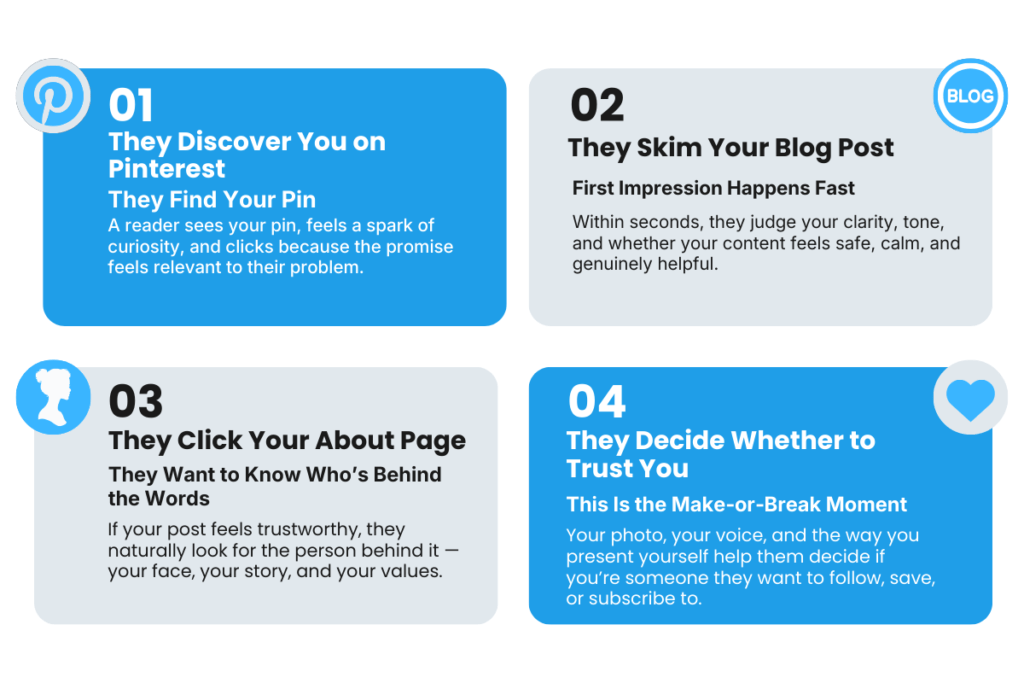
Here’s what happens when someone arrives from Pinterest: they see a pin, tap through, read a few lines of your post, and then — if they’re curious — they click “About.” They’re not looking for your credentials or a list of achievements. They’re looking for one thing: Can I trust this person?
Research on web design psychology confirms that people trust people, not faceless brands. Building emotional trust — what researchers call “affective trust” — requires humanizing yourself and fostering genuine connection. When your About page does this well, visitors are far more likely to Save your content, subscribe, and return.
When your About page does it poorly — or doesn’t exist at all — visitors close the tab. The trust window is gone.
The 6 essential elements of a reader-first About page
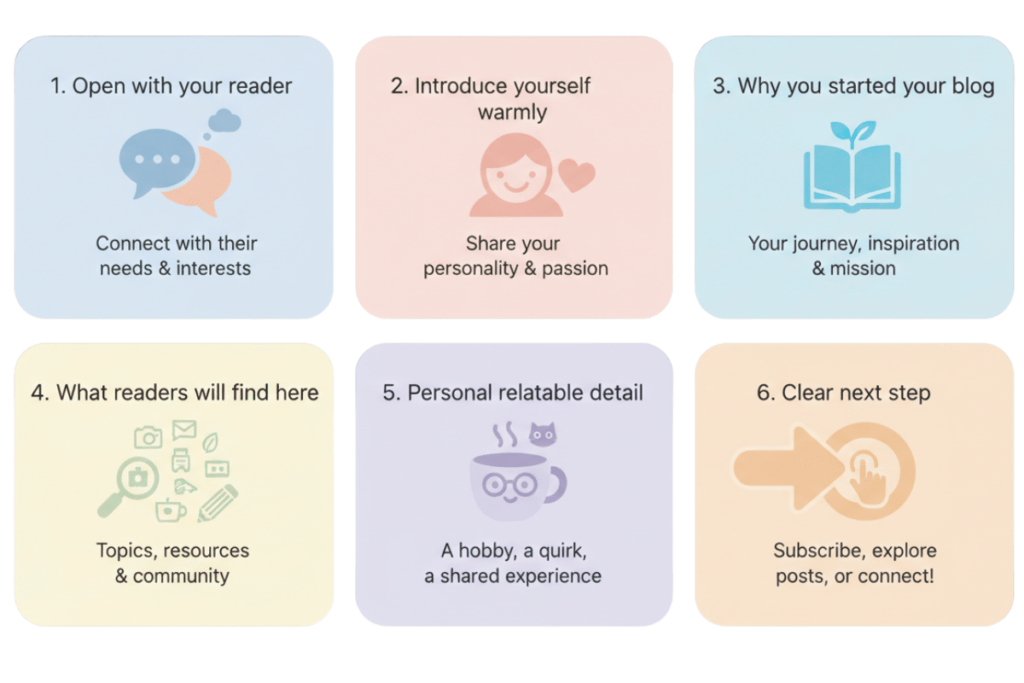
A strong About page isn’t about you — it’s about your reader seeing themselves in your story. Here are the six elements that make that happen, in the order they should appear on your page.
1. Open with your reader, not yourself
The biggest mistake beginners make is starting with “Hi, I’m [name] and I love [topic].” That puts the focus on you before the reader knows why they should care.
Instead, open with a sentence that names your reader’s problem or desire. This is what copywriting experts call “starting with the reader’s priorities” — leading with what matters to them before introducing yourself.
Wellness blog example: “If you’ve ever felt too exhausted for the gym but still want to feel strong and healthy — you’re in the right place.”
Finance blog example: “Drowning in budget spreadsheets that never seem to work? I’ve been there — and I built this blog to help you find a simpler way.”
Parenting blog example: “Being a new parent is beautiful and overwhelming in equal measure. This blog exists because you deserve practical help, not Pinterest-perfect pressure.”
2. Introduce yourself with warmth, not formality
After that opening hook, share who you are in 2–3 sentences. Write in first person (“I’m…”), use a conversational tone, and share one relatable detail that makes you human.
Food blog example: “I’m Maria — a home cook, busy mom of two, and someone who firmly believes dinner shouldn’t take longer than cleanup. I started this blog because I was tired of recipes that needed 47 ingredients and three hours.”
Keep it brief. You’re not writing a memoir — you’re building a first impression.
3. Explain why you started your blog
This is where authentic connection happens. Share your why — the real reason behind your blog. Research on personal brand storytelling shows that when readers understand your motivation, they form a deeper emotional bond.
Focus on:
- What problem were you trying to solve?
- What frustration led you here?
- What made you realize others might need the same help?
Wellness blog example: “After years of trying complicated fitness programs that never stuck, I discovered that 20-minute home workouts changed everything. I started sharing what worked — and realized other busy women were searching for the same thing.”
You don’t need a dramatic transformation story. Honesty is enough.
4. Tell readers what they’ll find here
Be specific about what topics your blog covers. This helps readers immediately understand whether your content is for them — and it reinforces the categories they’ll see in your navigation menu.
Finance blog example: “Here, you’ll find beginner-friendly guides on budgeting for families, saving for goals without feeling deprived, and building your first emergency fund — all explained in plain language.”
Tie your content description to 3–5 main categories. If you followed the earlier guide on How to Choose Blog Categories That Work on Pinterest (Pre-Launch Planning), you already have these mapped out.
5. Add a personal touch that makes you relatable
Include one or two personal details that feel genuine — not forced. This could be your location, a hobby, your family situation, or something quirky that shows personality.
Food blog example: “When I’m not testing one-pot recipes, you’ll find me organizing my pantry for the third time this week or convincing my kids that vegetables are, in fact, not poison.”
This small detail does big psychological work. Readers remember personal touches far longer than credentials. It signals: *this is a real person, and I like them.
6. End with a clear next step
Don’t let your About page be a dead end. Guide the reader to their next action — whether that’s reading your Start Here page, checking out a popular post, or joining your email list.
Example: “Not sure where to start? Head to my Start Here page — I’ve organized my best posts by topic so you can jump right in.”
A clear next step keeps readers moving through your site instead of bouncing.
Niche example: full About page for a wellness blog
Here’s how all 6 elements come together for a beginner wellness blogger:
If you've ever felt too overwhelmed to start a wellness routine — but still want to feel strong, rested, and in control of your health — this blog was made for you.

I'm Priya — a former corporate burnout who discovered that small, consistent habits matter more than extreme overhauls. After years of gym memberships I never used and diets I couldn't sustain, I found a simpler path: 20-minute home workouts, meal prep that doesn't require a culinary degree, and stress relief that fits between school drop-offs.

I started Balanced by Priya because I wished someone had told me earlier — *you don't have to do it all to feel better. You just have to start small.*

Here, you'll find beginner-friendly content on:

- Quick workouts you can do at home (no equipment needed)
- Simple meal prep and nutrition tips
- Stress management and sleep recovery
- Building healthy habits that actually stick

When I'm not writing, I'm probably making the same overnight oats for the fifth day in a row or pretending I'm going to organize my closet this weekend.

New here? Start with [My 5-Minute Morning Routine That Changed Everything] — it's my most-saved post for a reason.
Notice how it starts with the reader, introduces Priya warmly, explains her why, describes the blog content, adds a personal touch, and ends with a clear next step. You can follow this exact structure for any niche.
Niche example: full About page for a family finance blog
If you're tired of feeling anxious every time a bill arrives — and you want your family to feel financially secure without giving up everything you enjoy — you're in the right place.

I'm David — a dad of three, spreadsheet enthusiast, and someone who once had more credit card debt than savings. When my wife and I sat down and finally got honest about our money, everything shifted. Not overnight — but steadily, one budget cycle at a time.

I created Simple Family Finance because the financial advice I found online was either too complicated, too aggressive, or written for people without kids. I needed something practical, realistic, and kind.

Here's what you'll find:

- Family budgeting methods that actually work in real life
- Saving strategies for school costs, vacations, and emergencies
- Beginner-friendly debt payoff plans
- Money conversations to have with your partner (without fighting)

Outside of the blog, I coach my daughter's soccer team and have an unreasonable number of opinions about slow cooker recipes.

Not sure where to start? Check out [The One-Page Budget That Saved Our Family $400/Month] — it's the post that started it all.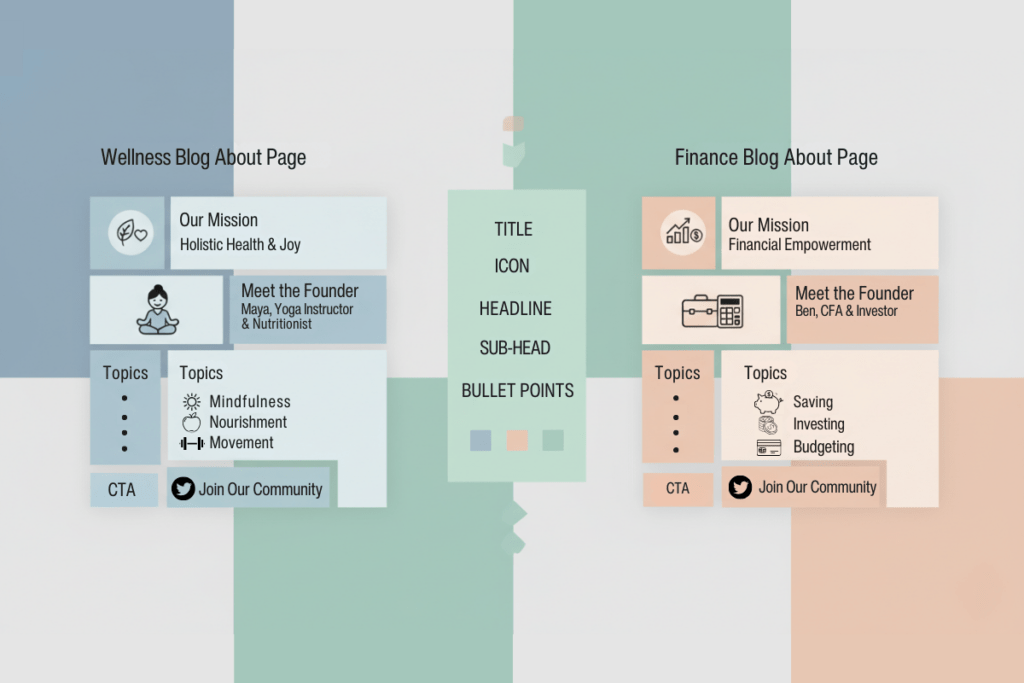
Common About page mistakes that kill reader trust
Even with the right structure, a few common errors can undermine everything. Here’s what to watch for — and how to fix it.
Mistake 1: Writing in third person
“Jane is a passionate food blogger who loves sharing recipes” feels cold and corporate. Write in first person — “I’m Jane, and I love testing quick dinner ideas for busy families.” First person builds immediate warmth and trust.
Mistake 2: Making it all about you
An About page that reads like a LinkedIn profile — education, certifications, career timeline — misses the point. Readers want to know how you help them, not where you went to college. Lead with their needs, then share your story as context.
Mistake 3: Skipping the personal touch
A page with zero personality reads like a template. Share one genuine detail — a hobby, a family quirk, a funny habit. According to research on empathy and writing, readers connect faster and deeper when they sense a real human behind the content.
Mistake 4: No photo of yourself
Adding a real photo of yourself dramatically increases trust. Research on website credibility consistently shows that pages with authentic personal photos generate higher engagement and longer time on page. Your photo doesn’t need to be professionally shot — a clear, friendly snapshot is enough.
Mistake 5: No next step for the reader
If your About page ends with “Thanks for reading!” and nothing else, you’ve wasted a high-traffic opportunity. Always include a link to your Start Here page, a popular post, or your email signup.
How to create your About page in WordPress
If you’ve been following this series, you already created a basic About page placeholder in 7 Pages Every Blog Needs Before You Launch (Complete Checklist). Now it’s time to add your real content.
- In your WordPress dashboard, go to Pages → All Pages.
- Find your About page and click Edit.
- Delete any placeholder text.
- Write your About page content using the 6-element structure above.
- Add a photo of yourself using the Image block (click the + button, search “Image,” and upload your photo).
- Click Update to save.
That’s it. If you’re using Blocksy or most modern WordPress themes, your About page will automatically match your site’s design.
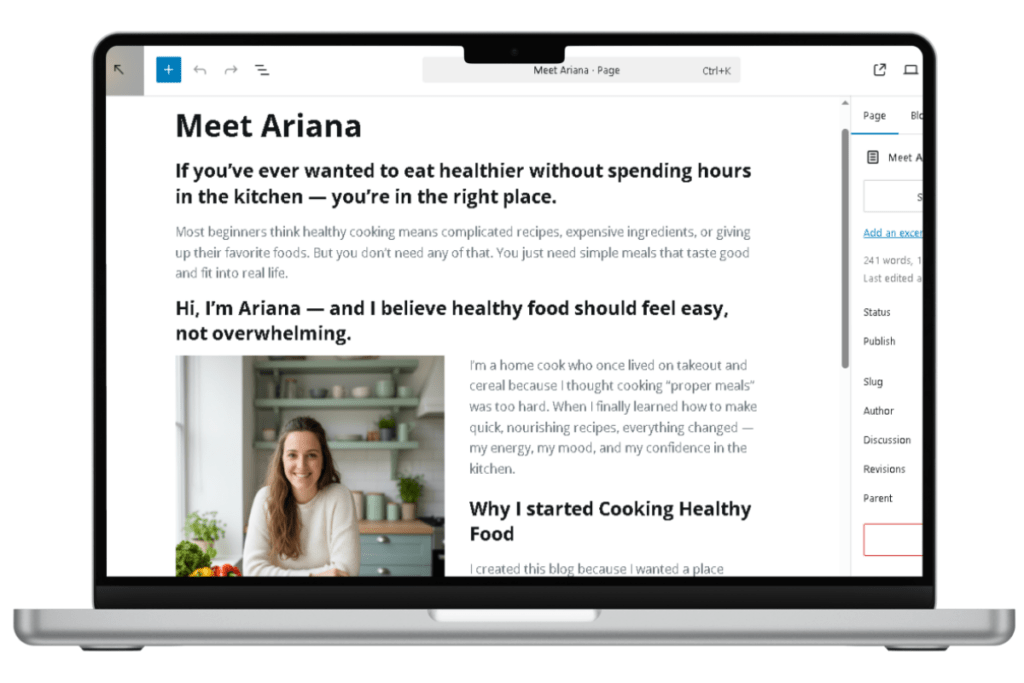
AI assistance: draft and refine your About page
Writing about yourself is one of the hardest things for new bloggers. AI can help you get a solid first draft — then you polish it until it sounds like you.
Use Google Gemini to create your first draft
Copy-paste this prompt into Google Gemini:
I’m creating an About page for my [NICHE] blog called [BLOG NAME]. My blog helps [TARGET AUDIENCE] with [MAIN TOPICS].
Write a warm, conversational About page that follows this structure:
- Open with a sentence that speaks to my reader’s main struggle or desire
- Introduce me: my name is [YOUR NAME], and here’s a relatable detail about me: [DETAIL]
- Explain why I started this blog: [YOUR REASON]
- List 3-5 content topics my readers can expect
- Add a personal touch: [HOBBY, FAMILY DETAIL, OR QUIRKY FACT]
- End with a clear next step directing readers to my Start Here page or most popular post
Make it sound friendly and authentic — not corporate. Aim for 250-350 words. Write in first person.
Gemini will generate a solid draft. Read it out loud — if anything sounds stiff or unlike you, edit it. Your About page should sound exactly like how you’d introduce yourself to a new friend.
Use Perplexity to verify your About page hits all the marks
Once you have a draft, use Perplexity to quality-check it. Copy-paste this prompt:
Review this blog About page for a beginner blogger. Check if it:
- Opens with the reader’s needs (not the blogger’s bio)
- Introduces the blogger warmly in first person
- Explains the “why” behind the blog
- Clearly describes what content the reader will find
- Includes at least one personal, relatable detail
- Ends with a clear next step (link to Start Here or popular post)
- Uses a warm, conversational tone appropriate for beginners
- Avoids jargon, third-person voice, or corporate language
Here’s my About page: [PASTE YOUR ABOUT PAGE DRAFT]
Suggest specific edits to improve warmth, connection, and clarity.
This two-step approach — draft with Gemini, refine with Perplexity — saves time while keeping your About page authentic and research-backed.
Quick checklist before you publish
Before hitting Update, run through this final check:
- About page opens with the reader’s problem or desire, not your bio
- Written in first person (“I’m…”) throughout
- Includes your name and a real photo
- Explains why you started your blog (your authentic motivation)
- Describes what content readers will find (tied to your blog categories)
- Includes at least one personal, relatable detail
- Ends with a clear next step (Start Here page, popular post, or email signup)
- Tone is warm, conversational, and beginner-friendly
- No third-person language, jargon, or corporate phrasing
- Page is linked in your navigation menu or footer
If every box is checked, you’re ready to publish.
What’s next?
Your About page is now doing what it should — building trust and connection with every visitor who lands on it. But trust isn’t just about your About page. It also depends on having the right legal protections in place.
Next, you’ll learn how to create a Privacy Policy for your blog — what to include, which free templates to use, and how to make sure you’re compliant from day one.
This foundation you’ve built is critical. Learn the complete blogging blueprint in Sophia Lee’s Beginner Blogging Course — designed for beginners who want results without the overwhelm.
FAQ: blog About page for beginners
Q: How long should my About page be?
Aim for 250–400 words. Long enough to cover all 6 elements, short enough that readers don’t lose interest. If you find yourself writing more than 500 words, you’re probably including too much backstory.
Q: Do I need a professional photo?
No. A clear, friendly photo taken with your smartphone in natural lighting is enough. What matters is that readers can see a real person — not a stock image or avatar.
Q: Can I update my About page later?
Absolutely. Your About page should evolve as your blog grows. Revisit it every 3–6 months to make sure it still reflects your content, your voice, and your reader’s needs.
Q: What if I don’t have a dramatic story to tell?
You don’t need one. Most readers aren’t looking for a hero’s journey. They’re looking for someone who understands their frustration and can help them take the next step. Honesty and empathy matter far more than drama.
Q: Should I include my credentials or qualifications?
Only if they’re directly relevant to your blog topic — for example, a certified nutritionist writing a wellness blog. Otherwise, your reader cares more about your experience and personality than your degrees.
Q: Where should my About page link appear?
In your main navigation menu (if you have room) or in your footer menu. Both work. The key is making it easy to find — don’t hide it.