
This post may contain affiliate links. As an affiliate, I may earn a commission if you purchase through my links, at no extra cost to you. I only recommend tools I personally use, have researched thoroughly, or that trusted blogging experts rely on every day.
Terms & Conditions for Bloggers: What to Include (+ Free Template)
Now that you’ve created your blog’s privacy policy in How to Create a Privacy Policy for Your Blog (Free Template Included), there’s one more protective layer your blog needs before you start publishing: a Terms & Conditions page. Having clear terms and conditions for blogs like yours protects your content, your advice, and your liability—all in one page.
If the phrase “Terms & Conditions” makes your palms sweat, take a breath. You don’t need a law degree. You don’t need to spend hundreds on a lawyer. And unlike your Privacy Policy, Terms & Conditions aren’t even legally required in most regions.
But here’s why you still want one: your Terms & Conditions page is the house rule book that protects you—if something unexpected happens.
This guide walks you through exactly what to include, gives you a free fill-in-the-blanks template, and shows you how to publish the page in WordPress in one sitting.
What you’ll learn in this guide
- Why Terms & Conditions matter (even though they’re not legally required)
- The 7 essential clauses every blogger needs
- A free, fill-in-the-blanks template you can customize right now
- How to create and publish your T&C page in WordPress
- Free generators vs. lawyer-drafted templates (honest comparison)
- AI prompts to help you customize and double-check your page
Why your blog needs terms & conditions
A Privacy Policy explains how you handle visitor data. Terms & Conditions explain how visitors can use your site.
Think of it this way: your Privacy Policy protects your readers. Your Terms & Conditions protect you.
Here’s what a Terms & Conditions page actually does for your blog:
- Protects your intellectual property. Every recipe, wellness guide, budgeting template, and parenting tip you publish is yours. Your T&C makes that explicit—and sets boundaries on how others can and can’t use your work.
- Limits your liability. If a reader follows your meal prep advice and has an allergic reaction, or tries a budgeting method that doesn’t work for them, your T&C’s disclaimer and limitation of liability clauses protect you from legal claims.
- Sets ground rules for comments and behavior. If your blog allows comments, your T&C defines what’s acceptable and gives you the right to remove inappropriate content.[^9]
- Creates enforceable rules. Courts are more likely to support your position if users violate clearly stated terms they agreed to by using your site.
- Builds professionalism and trust. Readers arriving from Pinterest see a polished, legally aware blog—and that signals credibility.
Without Terms & Conditions, you have no documented rules. If someone copies your entire blog post, misuses your advice, or posts harmful comments, you have limited legal standing to take action.
Are terms & conditions legally required?
No. Unlike Privacy Policies (which are required by GDPR, CCPA, and CalOPPA if you collect any personal data), Terms & Conditions are not legally required for most blogs.
However, they are strongly recommended by legal experts, blogging professionals, and platform-compliance guides—especially if your blog:
- Allows user comments
- Contains advice readers might act on (recipes, financial tips, wellness routines, parenting guidance)
- Uses affiliate links
- Links to third-party websites
- Plans to sell digital products or services eventually
The short version: your Privacy Policy is your legal obligation. Your Terms & Conditions are your legal shield.
The 7 essential clauses every blog T&C should include
You don’t need a 20-page legal document. For a beginner blog, these seven clauses cover the essentials:
1. Acceptance of terms
This clause establishes that by using your site, visitors agree to follow your rules. It’s the foundation that makes everything else enforceable.
What to include: A clear statement that using, browsing, or accessing your website means the visitor accepts your Terms & Conditions. If they disagree, they should stop using the site.
2. Intellectual property protection
Your blog posts, images, graphics, and original content belong to you. This clause protects your copyright and sets the rules for how others can (and can’t) use your work.
What to include: A statement that all content is your original property (or properly licensed), and that readers may not copy, reproduce, distribute, or republish your content without written permission.
3. Disclaimer (you’re not a professional advisor)
This is critical for any blog that shares advice—whether it’s meal planning, budgeting, fitness routines, or child development tips. Your disclaimer clarifies that your content is for informational and educational purposes only, not professional advice.
What to include: A general disclaimer plus a niche-specific disclaimer tailored to your blog’s topic.
Niche-specific examples:
- Food blog: “The recipes and nutrition information on this site are for informational purposes only. I’m not a registered dietitian—please consult a healthcare professional before making dietary changes.”
- Finance blog: “The financial information shared here is educational and does not constitute professional financial advice. Always consult a certified financial planner before making major financial decisions.”
- Wellness blog: “Content on this site is for informational purposes only and does not replace professional medical advice. Consult your doctor before starting any exercise or nutrition program.”
- Parenting blog: “The parenting strategies and tips shared here are based on personal experience and research, not professional child development advice. Consult your pediatrician for medical concerns.”
4. Limitation of liability
This clause protects you if someone claims your content caused them harm—financial loss, health issues, or other damages. It limits what you can be held responsible for.
What to include: A statement that you are not liable for any direct, indirect, incidental, or consequential damages arising from the use of your website or its content.
5. Third-party links disclaimer
Your blog probably links to external tools, resources, affiliate products, and other websites. This clause clarifies that you don’t control those sites and aren’t responsible for their content, privacy practices, or availability.
What to include: A clear statement that clicking external links takes readers to sites you don’t own or operate, and that you’re not responsible for third-party content or practices.
6. Comments and user-generated content policy
If your blog allows comments, you need rules. This clause gives you the right to moderate, edit, or remove comments that violate your standards.
What to include: Guidelines for acceptable behavior, a statement that you reserve the right to remove inappropriate content, and a note that commenters are responsible for their own words.
7. Changes to terms
Laws change. Your blog evolves. This clause gives you the right to update your Terms & Conditions and explains how readers will know about changes.
What to include: A statement that you may update these terms at any time, and that continued use of the site after changes means acceptance of the updated terms. Include the “Last Updated” date at the top of the page.
Free terms & conditions template (fill-in-the-blanks)
Copy this template, replace the bracketed text with your own information, and paste it into a new WordPress page. This is a starting point—not legal advice. For stronger protection, consider a lawyer-drafted template (more on that below).
Terms & Conditions
Last Updated: [DATE]
Welcome to [YOUR BLOG NAME] ([YOUR BLOG URL]). By accessing or using this website, you agree to be bound by these Terms & Conditions. If you do not agree with any part of these terms, please do not use this website.
1. Acceptance of terms
By browsing, reading, or interacting with [YOUR BLOG NAME], you acknowledge that you have read, understood, and agree to be bound by these Terms & Conditions and our Privacy Policy, which can be found at [LINK TO YOUR PRIVACY POLICY].
2. Intellectual property
All content on this website—including blog posts, images, graphics, logos, and downloadable resources—is the intellectual property of [YOUR NAME OR BUSINESS NAME] unless otherwise stated. You may not copy, reproduce, distribute, or republish any content from this site without prior written permission from [YOUR NAME OR BUSINESS NAME].
You are welcome to share links to my content, pin images to Pinterest (with proper credit), and quote short excerpts with a link back to the original post.
3. Disclaimer
The information provided on [YOUR BLOG NAME] is for general informational and educational purposes only. It is not intended as professional [CHOOSE: medical / financial / legal / dietary / parenting] advice.
[INSERT YOUR NICHE-SPECIFIC DISCLAIMER FROM THE EXAMPLES ABOVE]
I do my best to keep all information accurate and up to date, but I make no guarantees about the completeness, reliability, or accuracy of this information. Any action you take based on the information found on this website is strictly at your own risk.
4. Limitation of liability
[YOUR NAME OR BUSINESS NAME] shall not be held liable for any direct, indirect, incidental, special, or consequential damages resulting from the use of, or the inability to use, the content or materials on this website, even if [YOUR NAME OR BUSINESS NAME] has been advised of the possibility of such damages.
5. Third-party links
This website may contain links to third-party websites, products, or services. These links are provided for your convenience and do not signify endorsement. [YOUR BLOG NAME] has no control over the content, privacy policies, or practices of any third-party websites and assumes no responsibility for them.
Some links on this site may be affiliate links. If you make a purchase through an affiliate link, I may earn a small commission at no extra cost to you. Please see my full [Affiliate Disclosure](LINK TO YOUR AFFILIATE DISCLOSURE PAGE) for more details.
6. Comments and user-generated content
If you leave a comment on [YOUR BLOG NAME], you are responsible for the content of your comment. I reserve the right to edit, delete, or refuse to publish any comments that are:
- Spam or promotional in nature
- Offensive, abusive, or discriminatory
- Containing personal attacks or threats
- Including illegal content or links to harmful websites
By posting a comment, you grant [YOUR BLOG NAME] the right to display your comment publicly on the site.
7. Changes to these terms
I reserve the right to update or modify these Terms & Conditions at any time without prior notice. Changes become effective immediately upon posting to this page. Your continued use of [YOUR BLOG NAME] after any changes indicates your acceptance of the updated terms.
I recommend reviewing this page periodically. The “Last Updated” date at the top of this page will reflect the most recent revision.
8. Contact information
If you have any questions about these Terms & Conditions, please contact me at:
[YOUR NAME OR BUSINESS NAME] [YOUR CONTACT EMAIL OR CONTACT FORM URL]
End of template.
How to publish your terms & conditions page in WordPress
Once you’ve customized the template above (or generated one with a free tool), here’s how to add it to your blog:
Step 1: Log into your WordPress dashboard.
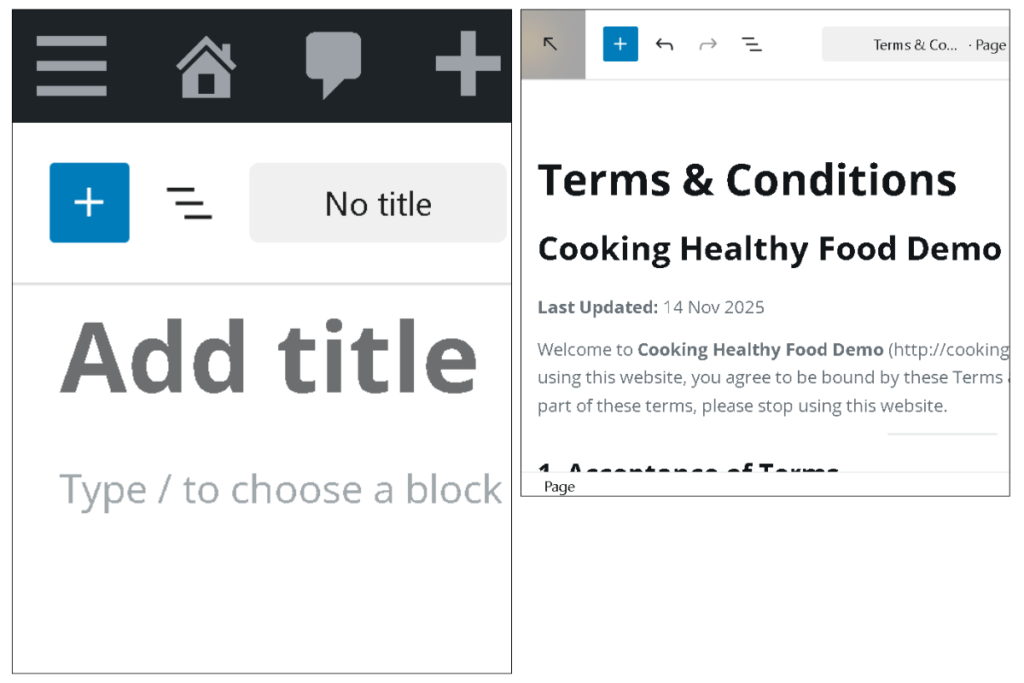
Step 2: Go to Pages → Add New Page.
Step 3: Title the page Terms & Conditions (or “Terms of Use”—both work).
Step 4: Paste your customized Terms & Conditions text into the page editor. Use WordPress headings (H2, H3) for each section to make it scannable.
Step 5: Check the URL slug. WordPress should auto-generate something like yoursite.com/terms-and-conditions. If it shows something messy, manually edit the slug to terms-and-conditions or terms-of-use.
Step 6: Click Publish (not just “Save Draft”—the page needs to be live).
Step 7: Add the page to your footer menu. Go to Appearance → Menus, select your footer menu, add the Terms & Conditions page, and save.
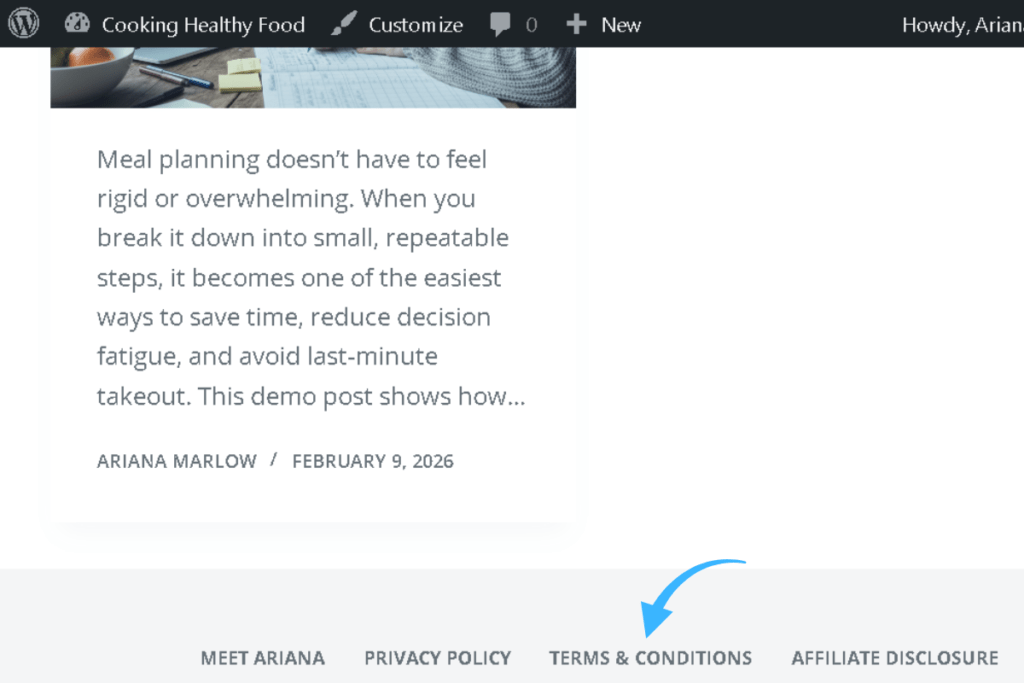
That’s it. Your Terms & Conditions page is now live and linked from your footer—visible to every visitor who lands on your blog from Pinterest or anywhere else.
Creating your T&C: free generators vs. lawyer-drafted templates
Just like your Privacy Policy, you have two main paths: free generators or lawyer-drafted templates. Here’s the honest comparison:
| Tool / Resource | Cost | Best For | Notes |
|---|---|---|---|
| ASelfGuru Legal Bundle | $47 | Complete legal protection | My #1 recommendation. Created by Amira, a licensed business lawyer who is also a blogger—so the Terms & Conditions language is written specifically for websites like yours. Includes Privacy Policy + Disclaimer + Terms & Conditions in one bundle. Fill-in-the-blank format, most bloggers finish in under an hour. Lifetime free updates, can be used on multiple websites. Far more protective than generic free text. |
| Termly | Free | Solid free option | One free T&C agreement, no credit card required. Step-by-step questionnaire generates a customized agreement. Good if you’re not ready to invest yet. |
| WebsitePolicies.com | Free tier | Simple setup | Questionnaire-based Terms generator. Better than copy-pasting from another site, but still not as tailored as lawyer-created templates. |
| FreePrivacyPolicy.com | Free | Backup option | Offers a Terms & Conditions generator. Useful as a starting point if you want everything in one place. |
Here’s the honest truth: free generators are better than nothing. They cover the basics and will protect you from the most obvious risks. But they’re generic—they don’t account for your specific niche, the advice you give, or how affiliate links work in your content.
If you can afford it, I recommend ASelfGuru’s Legal Bundle so your blog is covered with lawyer-written language, not just generic legal phrases. You can find the full bundle here: ASelfGuru Legal Bundle.
As blogger Lisa shared about the experience: she described having all three legal pages up in less than an hour and felt a huge weight off her shoulders. That peace of mind is worth it, especially when it costs a fraction of hiring a lawyer directly.
🤖 AI assistance: customize and double-check your terms & conditions
Whether you use the free template above, a generator, or ASelfGuru’s templates, AI can help you review and improve your Terms & Conditions.
Draft your niche-specific disclaimer with Google Gemini
If you’re struggling to write the disclaimer section in your own voice, use this prompt:
Copy-paste this into Google Gemini:
I’m writing a Terms & Conditions page for my [NICHE] blog called [BLOG NAME]. My blog helps [TARGET AUDIENCE] with [MAIN TOPICS].
Write a clear, beginner-friendly disclaimer that:
- States that my content is for informational and educational purposes only
- Clarifies I’m not a licensed [RELEVANT PROFESSIONAL — dietitian / financial planner / therapist / doctor]
- Recommends readers consult a qualified professional before acting on my advice
- Sounds warm and honest, not cold or corporate
Keep it to 3-4 sentences.
When to use this: After you’ve drafted your T&C but want a more polished, personalized disclaimer that matches your blog’s voice.
Review your T&C for completeness with Perplexity
Once you have your full Terms & Conditions page ready, use Perplexity to spot any gaps.
Copy-paste this into Perplexity:
Review these Terms & Conditions for a beginner [NICHE] blog. Check if they:
- Clearly explain that using the site means accepting the terms
- Protect my intellectual property (no copying my content without permission)
- Include a strong disclaimer that my content is informational, not professional advice
- Limit my liability if readers act on my content
- Address third-party links and external websites
- Cover comments and user-generated content
- Explain that I can update the terms and how users will know
- Use plain, easy-to-understand language
Here are my Terms & Conditions: [PASTE YOUR T&C PAGE]
Suggest specific edits to improve clarity, protect me as the site owner, and keep it beginner-friendly.
If you’re using ASelfGuru’s templates, this review step helps you understand what each clause does, so you feel confident standing behind your legal pages.
Reminder: AI tools can help you write clearer, more complete language—but they cannot replace legal advice. If you serve visitors from multiple regions with strict laws or plan to sell products, consider having a qualified professional review your final page.
Common mistakes to avoid
Mistake 1: Copying another blog’s Terms & Conditions. Never copy T&C from another website. Each blog’s terms must reflect your specific practices, niche, and risk profile. Free generators and templates are fast, safe starting points—copy-pasting from another site is neither.
Mistake 2: Using overly aggressive legal language. Your readers are beginner-friendly audiences arriving from Pinterest, not corporate lawyers. Terms written in intimidating legalese can scare visitors away. Keep the language firm but friendly—protect yourself without alienating your readers.
Mistake 3: Skipping the disclaimer section. If your blog gives any kind of advice—recipes, budgeting strategies, exercise tips—you need a disclaimer. This is the clause most likely to protect you in a real-world scenario.
Mistake 4: Putting T&C in the footer only and never updating it. Add it to your footer, yes—but also review it at least once a year or whenever you change how your blog operates (adding affiliate links, selling products, introducing a membership area). Update the “Last Updated” date each time you revise.
FAQ: terms & conditions for bloggers
Q: Do I legally need Terms & Conditions for my blog?
No. Unlike a Privacy Policy, Terms & Conditions are not legally mandated in most regions. However, they are strongly recommended because they protect your content, limit your liability, and give you enforceable rules if disputes arise.
Q: Can I use a free Terms & Conditions template?
Yes, as a starting point. Free generators like Termly and WebsitePolicies.com create basic, customizable agreements. For stronger, niche-specific protection—especially if you use affiliate links or share advice readers might act on—consider lawyer-drafted templates like ASelfGuru’s Legal Bundle.
Q: Where should I link my Terms & Conditions page?
In your blog’s footer menu, alongside your Privacy Policy and Affiliate Disclosure. This is where most readers (and legal compliance standards) expect to find it.
Q: Should my Terms & Conditions be on a separate page from my Privacy Policy?
Yes. They serve different purposes—Privacy Policy covers data handling, Terms & Conditions covers site usage rules—and should be individual pages with their own URLs.
Q: How often should I update my Terms & Conditions?
Review at least once a year. Update whenever you add new features (e-commerce, memberships, new affiliate programs), change your blog’s niche focus, or modify how comments or user content work on your site.
Q: What’s the difference between Terms & Conditions, Terms of Service, and Terms of Use? They’re essentially the same thing. “Terms & Conditions” is the most common phrasing for blogs. Use whichever sounds most natural for your brand—there’s no legal difference between the three.
What’s next?
You’ve just added another critical layer of legal protection to your blog. Combined with your Privacy Policy, your Terms & Conditions page creates a professional, trustworthy foundation that protects both you and your readers.
Next up: you’ll create the third and final legal essential—an affiliate disclosure that keeps you FTC-compliant from your very first affiliate link. Head to FTC-Compliant Affiliate Disclosure for Bloggers (Copy-Paste Template) to get it done in one sitting.
If you’re setting up all your essential pages at once, you might also find it helpful to revisit 7 Pages Every Blog Needs Before You Launch (Complete Checklist) to see how your legal pages, About page, and Contact page fit together.
Ready to get eyes on your new blog? Anastasia Blogger’s Pinterest SEO Traffic Secrets walks you through the exact strategy to turn this setup into consistent traffic.
Get Anastasia Blogger’s Pinterest SEO Traffic Secrets here (this is an affiliate link, which means I may earn a commission at no extra cost to you.)