

This post may contain affiliate links. As an affiliate, I may earn a commission if you purchase through my links, at no extra cost to you.
Why Blog Categories Matter More Than You Think
Most beginner bloggers overlook their category structure until they’re already publishing. By then, they’ve scattered posts across eight different categories, confused readers about their actual niche, and made it harder for Pinterest’s algorithm to understand what their blog is really about.
The truth is blunt: your blog categories are not just for organizing content on your website—they’re a direct strategy mirror for your Pinterest boards, and Pinterest’s algorithm rewards clarity.
When you create well-defined, focused categories, you’re doing three things simultaneously:
- Organizing your blog so readers can navigate easily
- Creating a Pinterest board roadmap that aligns with content pillars (more on this in a moment)
- Building topical authority in specific areas, which search engines (and Pinterest) recognize as expertise
If you’ve already completed your keyword research using the methods in our guide on finding Pinterest keywords, you likely identified 3-5 main keyword clusters. Your blog categories should mirror those clusters. This alignment is what separates high-performing blogs from scattered, low-traffic ones.
The Problem: Too Many Categories (or Too Few)
I’ve seen two extremes in beginner blogs:
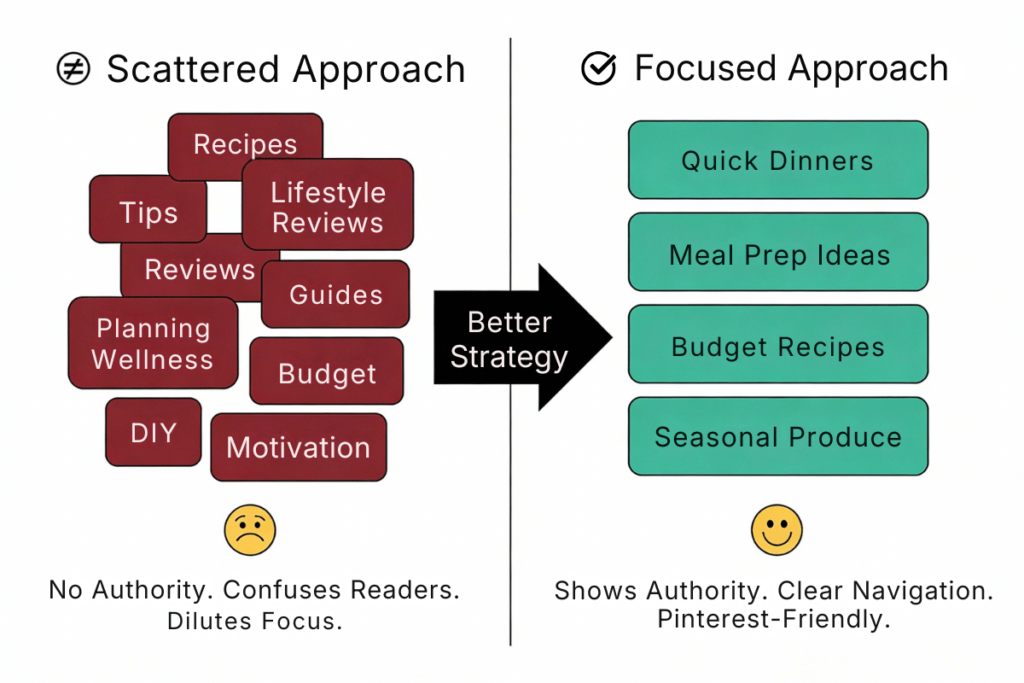
The Scattered Approach: A beginner blogger creates 10 categories right out of the gate—Recipes, Tips, Lifestyle, Reviews, Guides, Planning, Wellness, Budget, DIY, and Motivation. Readers get confused. Pinterest sees no clear authority. The blog looks unfocused.
The Single-Track Approach: A beginner creates just one category and throws everything into it. This saves on WordPress setup time, but it fails readers who want to browse by specific interest. It also fails on Pinterest because you’re pinning diverse content to a single board, which confuses the algorithm about what your blog really targets.
The Sweet Spot: 3-5 main categories that represent the core pillars of your content strategy, with optional subcategories to add depth without diluting authority.
Core Principle: Your Categories Should Reflect Your Content Pillars
A content pillar is simply a main theme or topic area where you’ll create multiple, related posts. Your blog categories should map 1:1 to these pillars.
Example: A Food Blog for Busy Moms
Instead of scattering recipes across a dozen categories, this blog might choose:
- Meal Planning (pillar: helping moms plan weekly meals)
- Quick Recipes (pillar: 30-minute dinners)
- Budget Meals (pillar: feeding family on a tight budget)
- Meal Prep (pillar: batching and freezing)
Each category becomes a potential Pinterest board. When you pin a new “30-Minute Spaghetti” recipe, it goes to the Quick Recipes board. When you post about “Batch Cooking Chicken Breasts,” it goes to Meal Prep. Readers understand what your blog offers. Pinterest’s algorithm understands your authority areas.
How Many Categories?
Research shows beginner blogs perform best with 3-5 main categories. Here’s why:
- 3 categories = laser-focused niche (narrow authority, fewer content opportunities)
- 4-5 categories = balanced depth and breadth (most common winning range)
- 6+ categories = starting to dilute focus (unless your niche is very broad)
How to Choose Your Categories: The 3-Step Process
Step 1: Identify Your Content Pillars (Using Your Keyword Research)
If you’ve completed your keyword research, you already have keyword clusters. These clusters become your categories.
Action: Open your keyword research spreadsheet (from our keyword research guide). Group similar keywords into 3-5 clusters based on topic area.
Example clusters:
- Cluster 1: “meal prep,” “meal prep for beginners,” “batch cooking,” “freezer meals”
- Cluster 2: “30-minute dinners,” “quick weeknight dinners,” “fast recipes”
- Cluster 3: “budget meals,” “cheap family dinners,” “grocery on a budget”
Each cluster becomes a category. This ensures your categories align with real search demand—people are actually looking for content in these areas.
Step 2: Test Category Names for Clarity and Consistency
Your category names should be:
- Clear (reader immediately understands what posts are in this category)
- Consistent (if you use “Budget Recipes,” don’t also use “Frugal Dinners” for the same topic)
- SEO-Friendly (include the keyword naturally, if possible)
- Not Too Clever (avoid vague names like “Meal Time Magic” when “Quick Dinners” is clearer)
Good category names:
- Meal Prep
- Quick Recipes
- Budget Meals
- Seasonal Food
Avoid:
- Yummy Ideas (too vague)
- The Kitchen Chronicles (cute but confusing)
- Life Hacks (too broad for a food blog)
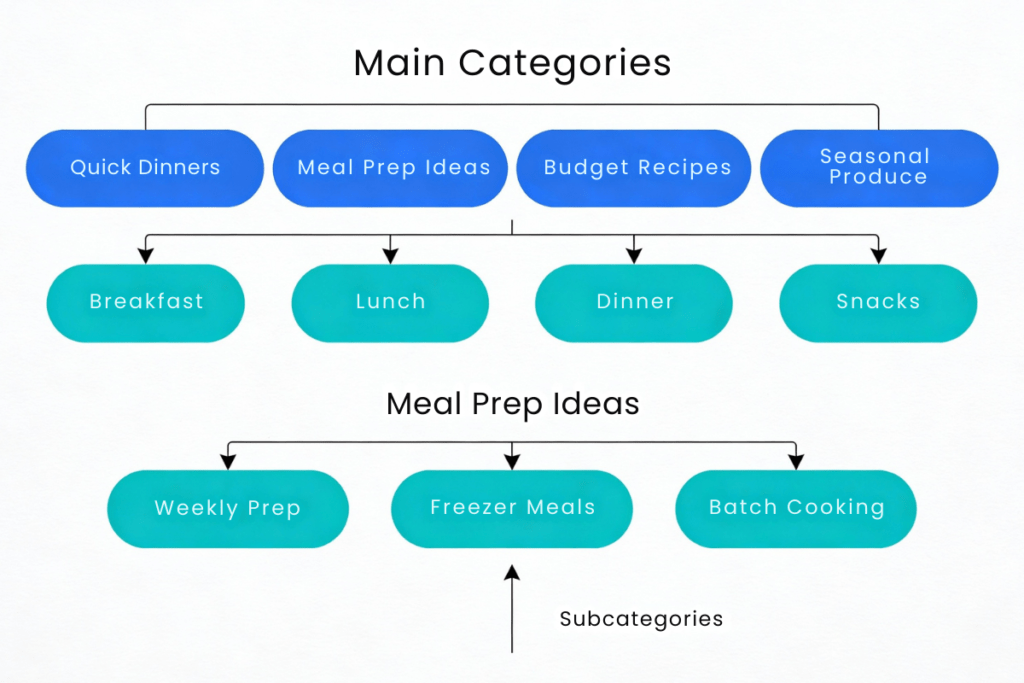
Step 3: Plan Subcategories (Optional But Powerful)
Subcategories let you add depth without creating top-level category confusion. They’re especially useful for larger niches.
Example:
Main category: Quick Recipes
- Subcategory: Breakfast
- Subcategory: Lunch
- Subcategory: Dinner
- Subcategory: Snacks
This structure lets readers filter by meal type while keeping the main category focused. It also gives you a secondary navigation structure that Pinterest boards can mirror.
Note: Subcategories are optional. If you’re just starting, keep it simple with 3-5 main categories and add subcategories once you have 20+ posts in a category.
Common Beginner Mistakes (and How to Avoid Them)
Mistake 1: Creating Categories Before You Know Your Niche
Many beginners guess at categories, then regret them 3 months later. This is why keyword research comes first. Your keywords guide your categories, not the other way around.
Fix: Complete your keyword research before choosing categories.
Mistake 2: Mixing Blog Content and Meta Content
Some beginners create categories like “About,” “Resources,” or “FAQ.” These are not content pillars—they’re about your blog, not your audience’s interests.
Fix: Keep these as pages, not categories. Your categories should only contain pillar content that serves your audience’s search intent.
Mistake 3: Changing Categories After Launch
Reorganizing categories after you’ve published 30 posts creates broken internal links, confuses Pinterest’s algorithm about your board structure, and frustrates readers who bookmarked category pages.
Fix: Spend time now getting categories right. They’re not permanent, but changing them costs time and SEO authority.
Mistake 4: Creating “Other” or “Miscellaneous” Categories
This is a red flag that your category structure isn’t working. If posts don’t fit into your 3-5 main categories, you either have posts that are off-topic (delete or refocus them) or your categories are too narrow (expand one category’s scope).
Fix: Every pillar content post should fit naturally into one of your 3-5 main categories. If it doesn’t, reconsider whether that post serves your niche.
Niche-Specific Category Examples
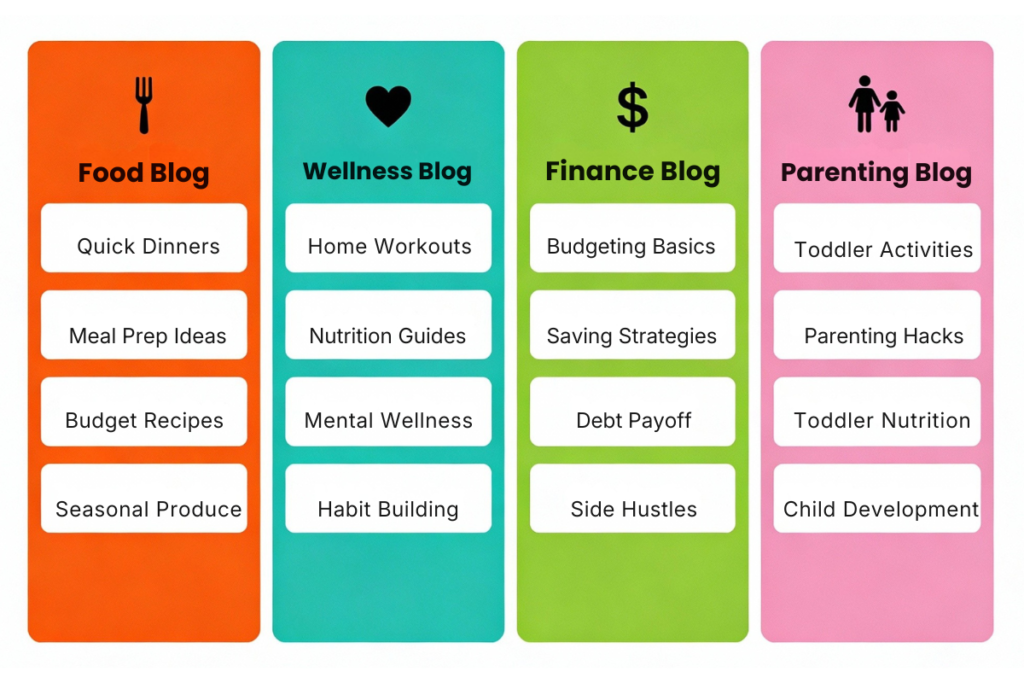
Different niches have different category structures. Here are real-world examples:
Food Blog (Meal Prep Focus)
- Quick Dinners
- Meal Prep Ideas
- Budget Recipes
- Seasonal Produce
Wellness Blog (Fitness + Health)
- Home Workouts
- Nutrition Guides
- Mental Wellness
- Habit Building
Finance Blog (Personal Money Management)
- Budgeting Basics
- Saving Strategies
- Debt Payoff
- Side Hustles
Parenting Blog (Toddler-Focused)
- Toddler Activities
- Parenting Hacks
- Toddler Nutrition
- Child Development
Notice the pattern: Each category represents a keyword cluster. Each is narrow enough to show authority but broad enough to sustain 15-30 posts. This is the beginner’s sweet spot.
How Blog Categories Connect to Pinterest Board Strategy
This is where category planning gets powerful.
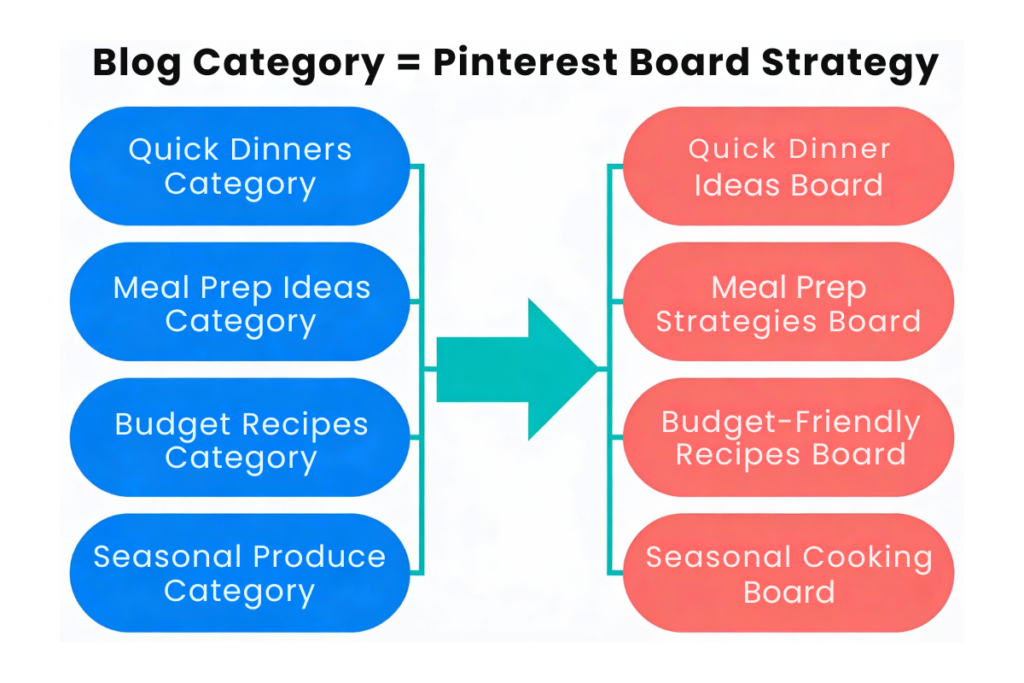
One-to-One Board Mapping: Each of your blog categories should become a Pinterest board.
If your blog has:
- Quick Dinners
- Meal Prep Ideas
- Budget Recipes
- Seasonal Produce
Then your Pinterest profile should have:
- Quick Dinner Ideas (board)
- Meal Prep Strategies (board)
- Budget-Friendly Recipes (board)
- Seasonal Cooking (board)
When you publish a new blog post in the “Quick Dinners” category, you’ll pin it to your “Quick Dinner Ideas” Pinterest board. This alignment helps Pinterest understand your niche and improves algorithmic reach because your pins are organized by theme, not scattered across unrelated boards.
How This Boosts Your Traffic:
Pinterest’s algorithm tracks which boards perform best with your audience. If your “Quick Dinners” board gets consistent engagement, Pinterest prioritizes similar content in users’ feeds. This only works if your boards (and the blog posts pinned to them) are tightly focused on one theme.
Preview: How You’ll Set Up Categories in WordPress (Later)
You don’t have a WordPress site yet—that comes after you set up hosting in the next post. But it helps to know what you’ll be doing once your site is live, so you can finalize your category decisions now with confidence.
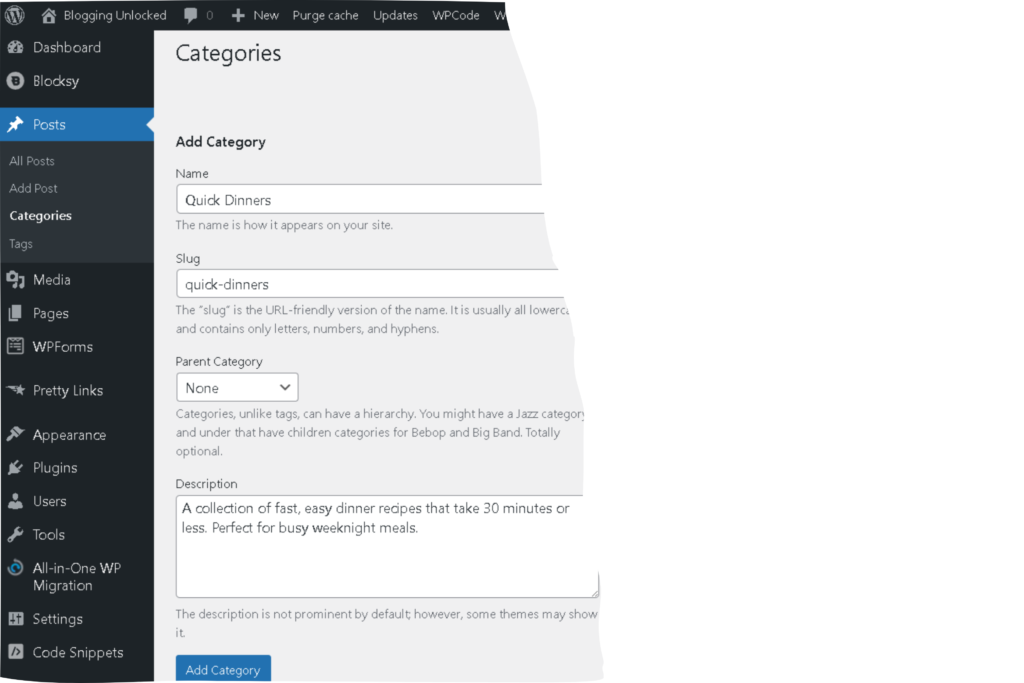
Here’s a quick preview of the WordPress category setup process (detailed full guide in our WordPress settings post):
Step 1: Create Categories in WordPress
- Log into your WordPress dashboard
- Navigate to Posts > Categories (left sidebar)
- Enter your category name, slug, and description
- Click “Add New Category”
- Repeat for each main category
Step 2: Create Subcategories (Optional)
- In the Categories page, select your main category as the “Parent Category” in the dropdown
- Enter subcategory name
- Save
Step 3: Assign Posts to Categories
When creating posts, you’ll check the category box on the right sidebar. Assign each post to ONE primary category for clean organization.
For now: Just finalize your 3-5 category names and structure. The technical setup happens after you have WordPress installed in the next post.
Using AI to Brainstorm and Organize Your Categories
If you’re still unsure about which categories fit your niche, AI can help you brainstorm and organize options.
Brainstorming with Google Gemini or Perplexity
Google Gemini or Perplexity are excellent for brainstorming category ideas based on your niche and keywords. It’s free and works directly in your browser.
Prompt to use:
I’m starting a blog about [your niche]. My target audience is [describe audience]. My main keywords are [list 5-10 keywords from your research]. Based on these keywords, suggest 5-6 blog categories that would organize this content logically. For each category, suggest 2-3 post titles that would fit in that category. Make sure the categories are narrow enough to show expertise but broad enough to sustain 15-20 posts each.
Example (Food Blog):
I’m starting a blog about easy weeknight dinners for busy working parents. My target audience is parents who cook 3-4 times per week and want meals ready in 30 minutes or less. My main keywords are “30-minute dinners,” “quick weeknight meals,” “easy family recipes,” “budget-friendly dinner ideas,” “meal prep for families,” “healthy quick recipes,” and “one-pot dinners.” Based on these keywords, suggest 5-6 blog categories. For each category, suggest 2-3 post titles that would fit.
Gemini or Perplexity will generate organized categories with example posts that naturally fit each category. This helps you visualize your category structure before building it.
Organizing Your Structure with a Spreadsheet
Once you have your categories, create a simple tracking spreadsheet:
| Category | Focus Keyword | Target Audience | Subcategories | Example Posts | Status |
|---|---|---|---|---|---|
| Quick Dinners | 30-minute dinners | Busy parents | Breakfast, Lunch, Dinner | “10 One-Pot Dinners Under 30 Minutes” | Live |
| Meal Prep Ideas | meal prep for families | Busy families | Weekly, Freezer | “Freeze 20 Dinners in 2 Hours” | Live |
| Budget Recipes | budget family meals | Budget-conscious parents | Breakfasts, Dinners | “Feed Family of 4 on $40/Week” | Planned |
| Seasonal Produce | seasonal cooking | Health-conscious cooks | Spring, Summer, Fall, Winter | “What to Cook With Spring Vegetables” | Planned |
This spreadsheet becomes your content roadmap. It ensures every post you write fits naturally into one category, and it prevents the “miscellaneous” category trap.
What’s Next?
Now that you understand how to structure your blog categories for Pinterest success, your next step is setting up the technical foundation.
Once your categories are decided, you’re ready for the next phase: setting up your web hosting and domain. Our guide on setting up web hosting for bloggers walks you through registering a domain, choosing reliable hosting, and getting your WordPress site live—all in 30 minutes.
The category structure you decide now becomes the foundation for everything that follows. It’s worth getting right before you move to the technical setup.
Final Checklist: Before You Move On
Before moving to web hosting setup, verify you’ve completed:
- ✅ Identified 3-5 content pillars from your keyword research
- ✅ Named each category clearly and consistently
- ✅ Verified that each category can sustain 15-20 posts
- ✅ Decided whether you need subcategories
- ✅ Mapped each category to a potential Pinterest board
- ✅ Ensured no “miscellaneous” or meta-content categories exist
- ✅ (Optional) Created a spreadsheet tracking your categories and example posts
If you’ve checked all these boxes, you’re ready to set up your actual website.
AI Assistance: Brainstorming & Organizing Your Categories
This post involves brainstorming your unique category structure based on your niche—the perfect use case for AI assistance.
Tool Recommendation: Google Gemini (Free)
Why Gemini? It’s free, requires no signup for basic use, and excels at brainstorming and organization tasks. No affiliate relationship, just the best tool for this job.
Copy-Paste Prompt (Customize with Your Details)
I'm creating a blog in the [YOUR NICHE] space.

My target audience: [Describe the person you're writing for]

My main content keywords: [List 5-10 keywords from your Pinterest keyword research]

Based on these keywords and audience, help me:

1. Brainstorm 5-6 blog categories that would organize my content logically
2. For each category, provide 2-3 example post titles that would fit naturally
3. Suggest whether each category needs subcategories
4. Warn me of any potential category overlap or confusing choices

Make sure each category is narrow enough to demonstrate expertise but broad enough to sustain 15-20 posts minimum. Avoid vague names like "Tips" or "Life Hacks."
Example (Swap in Your Details):
I'm creating a blog in the personal finance space focused on budgeting and debt payoff for single parents.

My target audience: Single parents earning $40,000-$70,000 annually who want to pay off debt and build savings without drastic lifestyle changes.

My main content keywords: budgeting for single parents, pay off debt fast, emergency fund, financial habits, budgeting hacks, money saving tips, side hustles for extra income, childcare costs

Based on these keywords and audience, help me brainstorm 5-6 blog categories...
What Gemini Will Do
Gemini will generate organized category suggestions with example post titles for each. This helps you visualize whether your categories feel natural and cover your keyword research thoroughly.
Next Step: Refine in a Spreadsheet
Take Gemini’s suggestions and plug them into a spreadsheet (see “Organizing Your Structure with a Spreadsheet” section above). This becomes your official category roadmap.
Ready to get eyes on your new blog? Anastasia Blogger’s Pinterest SEO Traffic Secrets walks you through the exact strategy to turn this category setup into consistent Pinterest traffic. Once your blog is live, a clear category structure combined with strategic pinning practices is what separates high-traffic blogs from quiet ones.