
Affiliate Disclaimer: This post may contain affiliate links. As an affiliate, I may earn a commission if you purchase through my links, at no extra cost to you. Please read our full disclosure for more info.
Important: This guide and the free template are for educational purposes only and are not legal advice. Privacy laws (like GDPR, CCPA/CPRA, and children’s privacy rules) vary by country and state. Always confirm requirements with a qualified professional or trusted legal template provider for your region before relying on any policy.
Why your blog needs a privacy policy (even if you feel “too small”)
If your blog collects any kind of personal data – email addresses for a free recipe e-book, names on a parenting newsletter, or analytics data for your finance content – you’re already handling information that privacy laws care about.
Even tiny blogs can fall under privacy rules like the GDPR (European visitors), CCPA/CPRA (California), and similar regulations in other countries, especially if you use tools like Google Analytics, ad networks, or email marketing software.
The exact rules, age thresholds, and rights available are different in each place (for example, EU vs. US states vs. UK), so this post gives you a simplified starting point, not a complete compliance manual.
Think of your privacy policy as a trust bridge: a simple page that tells your reader what you collect, why you collect it, and how you keep it safe.
When a busy mom signs up for your weekly “30-minute dinner” emails or a college grad opts into your “first apartment budget” checklist, your privacy policy is part of what makes that sign-up feel safe instead of risky.
What You’ll Learn
- The “Trust Bridge” Concept: Why a privacy policy is about reader connection and safety, not just legal boxes.
- Mandatory Disclosures: Exactly what you must list (email services, analytics, and cookies) even if you have zero traffic.
- Free Template Setup: A step-by-step guide to building your page in WordPress for $0 using our fill-in-the-blanks template.
- The Upgrade Path: How to identify when you need to move from free generators to professional, lawyer-drafted templates like ASelfGuru.
- AI-Powered Auditing: Using Perplexity to verify your generated policy is actually compliant and beginner-friendly.
This guide is Phase 3, Step 14 of our Start Here: How to Start a Blog for Beginners (Step-by-Step Roadmap).
What your privacy policy must cover (research-backed essentials)
Most privacy regulations and industry standards point to a few core questions your privacy policy for bloggers needs to answer in plain language. You can keep this simple and still be thorough, then get a legal review if you need deeper coverage for your country.
1. Who you are and how people can contact you
Your reader should know who is responsible for the website and how to reach out if they have questions about their data.
Include:
- Your blog or business name.
- The main way to contact you about privacy (contact form URL or email address).
- Your business location (city/country is often enough for solo bloggers; check your own legal requirements).
For example, a wellness blogger writing for “Sleep-First Moms” could say that the site is operated by a single owner based in Australia and can be contacted via a specific email address if readers want to access or delete their data.
2. What personal data you collect (and where it comes from)
Next, list the types of data you collect, and the places they come from.
Common examples for beginner bloggers:
- Email sign-up forms (name, email address).
- Comment forms (name, email, IP address).
- Contact form submissions (name, email, message content).
- Analytics tools (IP address, device information, pages viewed).
If you run a simple food blog, that might look like: sign-up forms for weekly meal plans, recipe comments, and privacy-friendly analytics to see which recipes your readers save and share from Pinterest most often. Parents reading your homeschooling blog might submit their name and email to get a printable schedule – that’s data you must acknowledge.
3. Why you collect data and your legal basis
Privacy laws don’t just care what you collect; they want to know why and under what legal basis you’re allowed to do it.
For most beginner bloggers, the main reasons are:
- To send newsletters or updates the reader explicitly signed up for (consent).
- To reply to questions sent through your contact form (legitimate interest).
- To understand which posts perform well so you can improve your content (legitimate interest/consent, depending on region and cookie settings).
A finance blogger might explain that they use anonymized analytics to see whether “grocery budget” or “student loan payoff” posts help readers more, so they can create better guides, not to track individual people.
4. Cookies, tracking technologies, and analytics
If you use cookies (almost all blogs do), you need to explain what they do and how readers can control them.
Be sure to cover:
- That your blog uses cookies and similar technologies.
- The purpose (analytics, remembering preferences, possibly ads).
- A link to your cookie policy or cookie banner settings, if you use one.
- How users can manage cookies in their browser.
For a Pinterest-first blog, be clear if you’re using tools like Pinterest Tag, Google Analytics, or ad network scripts that track visits from pins. A wellness blogger can reassure readers that cookies are used to understand which meditation posts get the most saves and clicks from Pinterest, not to identify individual health conditions.
5. Email marketing tools and newsletters
If you collect emails to send your weekly content (for example, “Sunday Meal Prep Plan” or “Money Mindset Monday”), you have to explain:
- Which email marketing service you use (e.g., Systeme.io).
- What data you store (usually name and email address).
- That readers can unsubscribe at any time and how.
Email regulations such as CAN-SPAM (US) and other anti-spam laws require clear unsubscribe options and honest subject lines, and they expect your privacy policy to support that transparency.
6. Comments, forms, and user-generated content
If your readers can leave comments on recipes, share feedback on your parenting hacks, or submit questions via a form, your policy should state:
- What information is collected when they comment or fill out a form.
- That their comments may be publicly visible on your site.
- That spam detection tools (like Antispam Bee or other anti-spam plugins) may process their comment and IP address.
For example, a parenting blogger can mention that when someone leaves a comment about toddler sleep struggles, the comment and name show publicly, but email addresses are never displayed.
7. Third-party tools and who else can access data
Beginners often underestimate how many third-party tools touch their reader data.
Your privacy policy should list:
- Analytics tools (e.g., Google Analytics).
- Email service providers.
- Ad networks or affiliate platforms (if used).
- Plugins that may process personal data (contact forms, spam filters, security).
If you run a finance blog and use an email service plus an analytics provider, name each clearly and link to their own privacy policies where possible so your reader can go deeper if they want.
8. Data storage, security, and how long you keep data
You don’t need to write like a lawyer here, but you do need to be honest about:
- How long you keep data (e.g., until someone unsubscribes, or for a specific number of years).
- That you take reasonable measures to protect data (strong passwords, secure hosting, HTTPS).
- That no system can be guaranteed 100% secure.
For example, a wellness blogger might explain that emails are stored in their email platform as long as readers remain subscribed, and that they use HTTPS, strong passwords, and limited account access to protect that list.
9. International visitors and children’s privacy
If your blog is accessible worldwide (which it usually is), you should:
- Acknowledge that people from different countries may visit.
- Note that you don’t knowingly collect data from children under a certain age and what to do if a parent contacts you about this.
Because laws differ across regions, the examples in this post are simplified and may not mirror every requirement in your specific country or state. You’ll use them as a starting point, then confirm the details that apply where most of your readers live.
A parenting blogger can explicitly state that their content is for caregivers, not children, and that any suspected underage sign-ups will be removed on request.
Step-by-step: How to build your privacy policy page in WordPress
In this section, you’ll turn the essentials above into an actual page on your site, even if legal language makes you want to close your laptop. You’ll set up the page itself, publish it, and make sure it appears in your footer/menu where Pinterest visitors can easily find it.
Step 1: Decide where your privacy policy will live in your menu and footer
Before you write anything, decide where readers will find this page.
For most beginners, the best setup is:
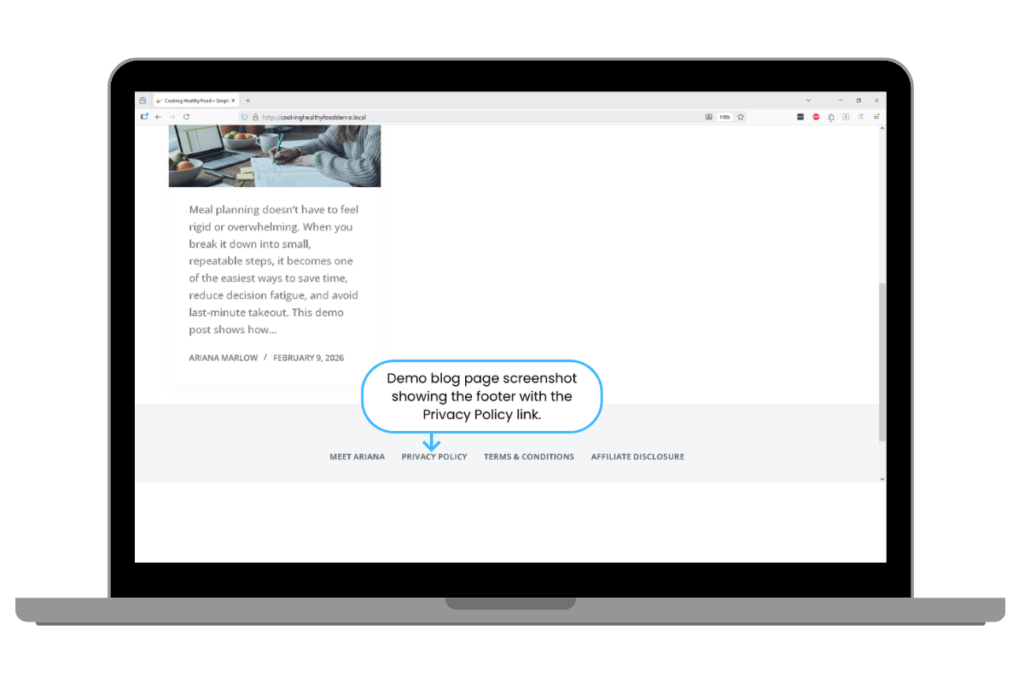
- A clear “Privacy Policy” link in your site footer.
- Optionally, a link in your main navigation under “Start Here” or “About,” if you want extra visibility.
If you run a food blog, imagine your reader quickly checking your footer before entering their email to get your weekly meal plan. If they see “Privacy Policy” next to “About” and “Contact,” it signals that you’re taking their data seriously, not just chasing pageviews or extra Pinterest traffic.
Step 2: Create the page in WordPress
Most WordPress setups make this simple.
- In your WordPress dashboard, go to Pages → Add New.
- Enter the title “Privacy Policy” (avoid cute names; clarity wins here).
- Check the URL slug in the Permalink settings and set it to something clear like
privacy-policyso your final URL looks likehttps://yourblog.com/privacy-policy/. - If your editor shows a “Template” option, leave it on the default page template.
- Click Save Draft so you don’t lose your work.
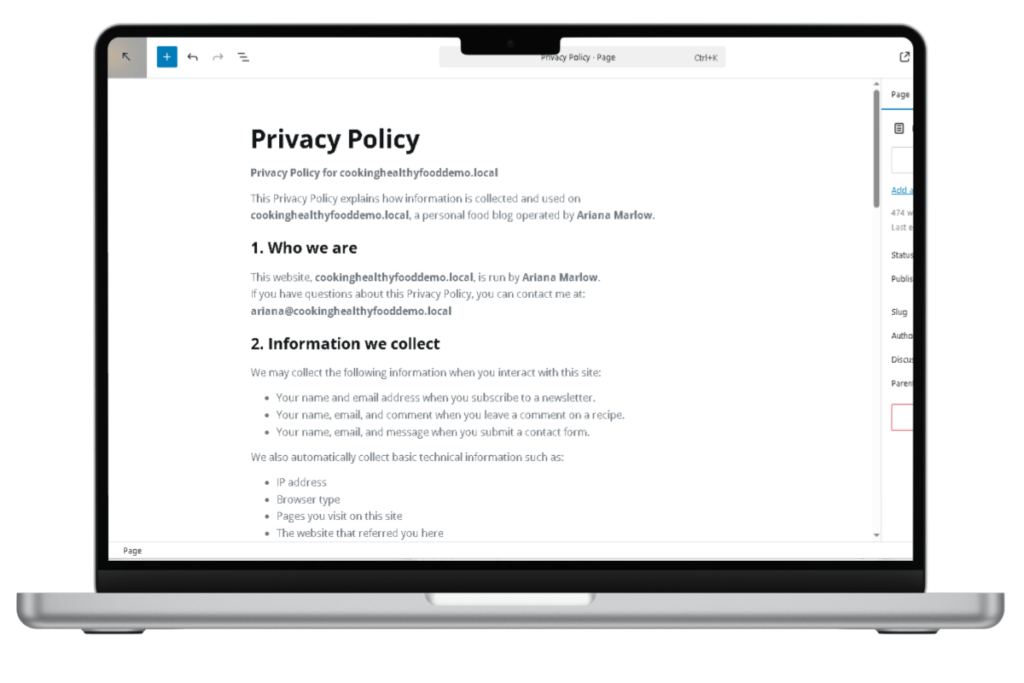
Now you have a blank canvas where you’ll paste and customize your privacy policy content.
Step 3: Use the free template structure (and customize it to your niche)
You can use the outline below as a structure to build your own privacy policy, then refine or review it with a professional if needed.
Suggested sections:
- Introduction and who we are.
- What data we collect.
- How and why we use your data.
- Cookies and analytics.
- Email marketing and communications.
- Comments and contact forms.
- Third-party services.
- Data retention and security.
- International visitors.
- Your data rights.
- Changes to this policy.
- How to contact us.
If you write about wellness, make sure your examples reflect that (e.g., “stress reduction tips newsletter” instead of generic “updates”). If you’re in finance, use examples like “monthly budgeting checklist” or “debt freedom roadmap emails” to keep things grounded and real.
Educational-only notice: This template structure is for educational purposes and does not replace legal advice. For specific legal obligations in your region, consult a qualified professional or reputable legal template provider.
Step 4: Add clear, human language (no scare tactics)
Readers skim legal pages, especially on mobile. Use:
- Short paragraphs and bullet points.
- Headings that sound like questions your reader might actually ask (“What information do we collect?”).
- Plain language instead of dense legal jargon.
For example, instead of writing “We may process personal data in accordance with applicable regulations,” a parenting blogger could say, “When you subscribe to my weekly activities newsletter, I store your name and email so I can send you the tips you requested. You can unsubscribe any time using the link at the bottom of every email.”
Whenever you mention laws (GDPR, CCPA/CPRA, CAN-SPAM), add a soft reminder that you’re giving a simple overview so beginners don’t panic: “You don’t have to become a lawyer overnight; this page is about honest, clear communication with your reader.”
Step 5: Publish the page and link it in your footer and forms
Once your page is written:
- Click Publish (or Update if you’re editing an existing page).
- Visit the live URL (for example,
https://yourblog.com/privacy-policy/) and make sure everything looks correct on desktop and mobile.
Then link it in the places where readers are most likely to think about privacy:
- Add “Privacy Policy” to your footer menu (via Appearance → Menus or your theme’s header/footer builder, depending on your setup).
- Add a short line under major forms, like: “By signing up, you agree to our Privacy Policy” with a link to the page.
- Make sure any cookie banner or consent tool points to this page as well.
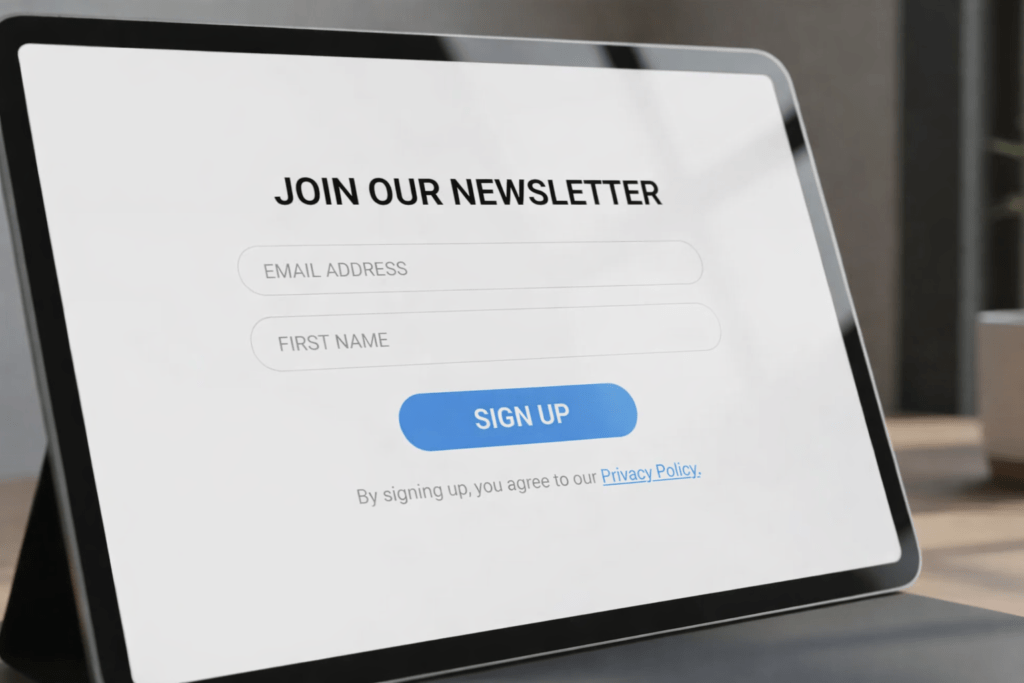
That way, a reader grabbing your “5-Day Meal Prep for Busy Nurses” freebie or “3-Step Debt Reset Tracker” sees a consistent, honest promise about how their details are handled.
Optional check: In themes like Blocksy, also verify that your Privacy Policy appears in mobile footers and that links are easy to tap for Pinterest visitors coming from their phones.
Free privacy policy template (fill-in-the-blanks)
Use this structure as a starting point to create your own privacy policy. Replace the placeholders in brackets with your information and adjust examples to match your niche (food, wellness, finance, or parenting).
Educational-only notice: This template is not legal advice and does not create any lawyer–client relationship. Always review your final policy with a qualified professional familiar with your country or region’s laws and update it as laws change.
[Blog Name] Privacy Policy
1. Who we are
“[Blog Name]” (“we”, “us”, or “our”) is a personal blog about [your niche, e.g., “budget-friendly family meals” / “gentle parenting” / “beginner-friendly budgeting” / “stress-aware wellness habits”]. This website is operated by [Your Name or Business Name], based in [City, Country]. If you have questions about this privacy policy or how we handle your data, you can contact us at: [your contact email or contact form URL].
2. What information we collect
We collect information that you provide directly to us, such as:
- Name and email address when you subscribe to our newsletter.
- Name, email, and any information you share when you submit a contact form.
- Name, email, and comment content when you leave a comment on a blog post.
We also automatically collect certain information when you visit this website, such as:
- IP address, browser type, and the pages you visit.
- The referring website (for example, a Pinterest pin or search result).
- The time and date of your visit.
3. How and why we use your information
We use your information to:
- Send you the emails and resources you requested (such as weekly recipes, money tips, or parenting activity ideas).
- Respond to your messages and questions.
- Improve our content by understanding which posts are most helpful to readers (for example, by seeing which posts get the most visits and saves from Pinterest).
- Monitor and protect the security of this website.
Our legal bases for processing this information may include your consent, our legitimate interest in providing and improving our content, and our need to comply with legal obligations.
4. Cookies and analytics
We use cookies and similar tracking technologies to run this website and understand how it is used.
Cookies may:
- Remember your preferences, such as whether you’ve dismissed a popup.
- Help us see which blog posts are most popular and which ones attract the most visitors from Pinterest.
- Support features like embedded content.
We may use analytics tools such as Google Analytics or privacy-focused alternatives to collect aggregated data about website traffic and usage patterns. These tools may use cookies and collect information such as your IP address, device type, and which pages you visit.
You can usually disable cookies in your browser settings, but some parts of the site may not function properly if you do.
5. Email marketing and newsletters
If you choose to join our email list, we will store your name and email address with our email marketing provider, [Email Service Provider Name].
We use this information to:
- Send you newsletters, new blog posts, and occasional updates related to [your niche].
- Deliver free resources you requested (such as checklists, printables, or guides).
Every email includes an unsubscribe link at the bottom. You can stop receiving emails at any time by clicking that link or contacting us directly.
6. Comments and contact forms
When you leave a comment on a blog post, we collect the data shown in the comment form, your IP address, and your browser user agent string to help with spam detection. Your comment and name may appear publicly on the site. Your email address will never be displayed publicly.
If you submit a contact form, we collect the information you provide (such as your name, email, and message) so we can respond. We do not use this information for marketing unless you explicitly ask us to.
7. Third-party services
We may share information with third-party companies that help us operate this website and deliver our content, such as:
- Email marketing services (to send newsletters).
- Analytics providers (to understand site usage).
- Security and spam prevention tools.
- Advertising or affiliate partners if we run ads or share affiliate links.
These providers may process your data on our behalf and are only allowed to use it as needed to perform their services. We do not sell your personal information to third parties.
8. Data retention and security
We keep your personal data only as long as necessary for the purposes we collected it for, including satisfying any legal or reporting requirements.
For example:
- We keep email subscriber information as long as you remain subscribed.
- We may keep contact form messages and comment records for a reasonable period for record-keeping and site safety.
We use reasonable technical and organizational measures to protect your personal data, such as secure hosting, HTTPS, and limited account access. However, no method of transmission or storage is completely secure, and we cannot guarantee absolute security.
9. International visitors
This website may be accessed from countries other than [your country]. If you visit from outside [your country], please be aware that your information may be processed and stored in [your country] and other locations where our service providers operate.
By using this website, you agree that your information may be transferred to and processed in these locations. The exact rights available to you may differ depending on your country or state’s laws.
10. Your rights
Depending on your location, you may have rights related to your personal data, such as:
- The right to access the personal information we hold about you.
- The right to request corrections.
- The right to request deletion.
- The right to withdraw consent where processing is based on consent.
To exercise these rights, contact us at [your contact email or form URL]. We may need to verify your identity before fulfilling your request.
11. Children’s privacy
This website and its content are intended for adults and caregivers, not children. We do not knowingly collect personal information from children under [CHOOSE ONE AGE, E.G., 13 OR 16, BASED ON YOUR LOCAL LAW].
Important: Before publishing your privacy policy, replace the bracketed age above with a single number (for example, 13 or 16) that matches the main law in your region, and remove the brackets. If you are unsure, quickly search your local rule or ask a qualified professional.
If you believe that a child has provided personal information to us, please contact us so we can remove it.
12. Changes to this policy
We may update this privacy policy from time to time. When we do, we will update the “Last updated” date at the top of this page.
Because privacy laws and tools change over time, we recommend reviewing and refreshing your privacy policy at least once a year to make sure it still reflects how your blog and tools work.
13. How to contact us
If you have any questions about this privacy policy or how we handle your data, contact us at:
[Your Name or Business Name]
[Contact email address]
[Optional: postal address or contact form URL]
AI Assistance: use AI to customize and double-check your privacy policy
If legal language makes you freeze, AI can help you brainstorm, clarify, and organize your privacy policy – as long as you stay honest about your data and treat AI as a helper, not a lawyer.
How to use Perplexity for research-backed wording
Use Perplexity when you want to:
- Clarify how privacy laws describe a concept (like “data retention” or “lawful basis”).
- Check whether your explanations are accurate and beginner-friendly.
- Understand how other reputable sites communicate similar ideas.
Prompt to paste into Perplexity:
“I run a beginner-friendly [food / wellness / finance / parenting] blog. I collect email addresses for a newsletter and use privacy-friendly analytics (no intrusive tracking). Please help me write a 2–3 sentence explanation of how I use this data, in calm, non-scary language that would make sense to a busy beginner. Keep it legally accurate but understandable.”
How to use Google Gemini for structure and clarity
Use Google Gemini when you want to:
- Organize your sections.
- Turn your rough notes into clear headings and bullet points.
- Spot confusing or repetitive language.
Prompt to paste into Google Gemini:
“I’m writing a Privacy Policy page for my beginner [food / wellness / finance / parenting] blog. Here is my draft text.
1) Re-organize it into clear sections with headings like ‘What information we collect’ and ‘How we use your information’.
2) Highlight any sentences that might feel too technical or scary for beginners.
3) Suggest simpler alternatives without changing the meaning.”
When to get human legal help
AI tools can help you write clearer, kinder privacy language, but they cannot replace legal advice. If you:
- Serve visitors from multiple regions with strict laws.
- Collect sensitive data (health, financial account details, children’s information).
- Run paid products or memberships with complex data flows,
consider asking a qualified professional or reputable legal template provider to review your final policy.
Internal links: where to guide your reader next
As you finish your privacy policy page, it’s the perfect moment to remind readers that their experience on your site is about more than legal boxes – it’s also about clarity and connection.
- Earlier in this journey, you learned how to write an About page that actually sounds like you in “How to Write an About Page That Connects With Your Readers (Examples)” – that’s where your brand personality comes to life.
- Next in this legal mini-series, you’ll create a Terms & Conditions page in a dedicated post called “Terms & Conditions for Bloggers: What to Include (Free Template)” so you can set boundaries around your content, offers, and disclaimers without sounding harsh.
- If you’re setting up all your essential pages at once, you might also like “7 Pages Every Blog Needs Before You Launch (Complete Checklist)” to see how your legal pages, About page, and contact page fit together.